Stock transaction history
Every change to an item’s stock is written down. The Stock Transaction History at the bottom of the item page is that record: what moved, when, why, and what the item was left with.
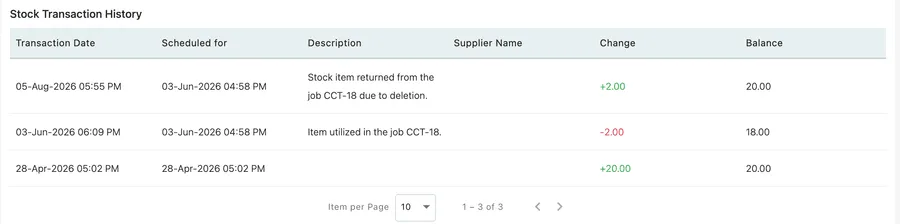
Item page → Stock Transaction History
| Column | What it holds |
|---|---|
| Transaction Date | When the stock actually moved. |
| Scheduled for | The date the work behind the movement was scheduled for. For a job that ran late, this is the job’s date rather than the day the stock came off. |
| Description | Why it moved. Movements you make yourself carry whatever you typed in the Description box; movements caused by a job are described by the app — Item utilized in the job CCT-12, or Stock item returned from the job CCT-18 due to deletion. |
| Supplier Name | Who supplied the batch, on movements where you named a supplier. |
| Change | How much moved. Additions are green and signed +, removals red and signed −. |
| Balance | What the item stood at after that movement. |
Reading down the list from the bottom gives you the whole life of the item’s stock: what you started with, what each job took, what came back.
Item per Page and the arrows at the foot of the table page through a long history.
What lands here
Section titled “What lands here”Everything that moves the number writes here — your own Add/Remove Stock adjustments, jobs and invoices that take stock as they save, and purchase orders delivered into inventory. See where stock comes from and goes.
One thing deliberately leaves no trace here: a part ordered against a single job and taken straight onto that job never enters your stock, so there is nothing to record. It is on the job and on the purchase order instead.