Finishing a job in the app
What the fieldworker writes before they drive away is the job’s report. It is what you read on completion detail, what the client reads on the job card, and what settles the argument six months later about what was actually done.
Completion Form → Add on the job opens it.
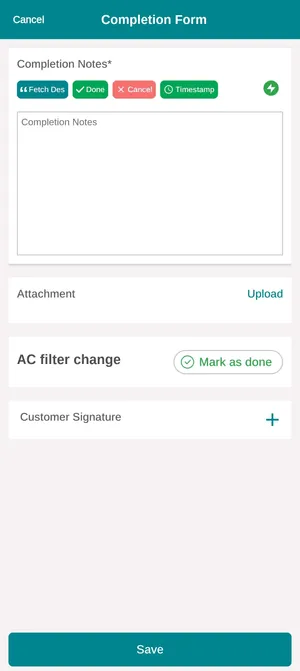
The app → a job → Completion Form
Completion Notes
Section titled “Completion Notes”The notes are the account of the visit — what was found, what was done, what still needs doing. They are required, and they are written on a phone at the end of a long day, which is what the row of buttons above the box is for:
| Button | What it puts in |
|---|---|
| Fetch Des | Pulls in the job’s description, so the note starts from what the job was supposed to be |
| Done | The short answer, for work that went exactly as booked |
| Cancel | The other short answer, for a visit that could not go ahead |
| Timestamp | Stamps the current date and time into the note |
They are shortcuts, not replacements. A note saying only Done tells the client nothing, and the client is who eventually reads it.
Photos
Section titled “Photos”Attachment → Upload adds pictures to the visit. Before-and-after pairs of the same thing are the ones worth taking: they are the difference between telling a client the work was done and showing them. They arrive on the job’s attachments and on completion detail.
Marking the work done
Section titled “Marking the work done”The job type sits on its own card — AC filter change here — with Mark as done beside it. A job booked for three kinds of work has three of these, so a visit that finished two of them and left the third says so, rather than being recorded as finished.
The client’s signature
Section titled “The client’s signature”Customer Signature captures the client’s name and signature on the phone before the fieldworker leaves. It is the acceptance of the work: it appears on the job card, and it is the record that whoever was on site was happy at the time.
Save files the report. Actual Job Time on the job fills in from the status changes made through the day — when work started and finished — and can be corrected from the office if a phone lost signal. See correcting times.
After it is saved
Section titled “After it is saved”Completing a job does not take it off the phone. The fieldworker can go back in and add the photo they forgot or fix a note. It leaves their list when the office closes the job — see job statuses.