A client's payments
Payment is the client’s account as a ledger — every invoice raised and every payment received, in date order, with a running balance carried down the page.
The Invoice tab tells you what each document is worth. This tab tells you the story of the account.

Clients → the selected client → Payment
The same three figures head the tab as on the Invoice tab — Total Invoice Amount, Invoice Amount Paid and Due Amount — with two buttons above them:
- Export takes the ledger out of the app.
- Preview & Send Email sends the client a statement of the account, so you can show them the whole history rather than argue about one invoice.
The ledger
Section titled “The ledger”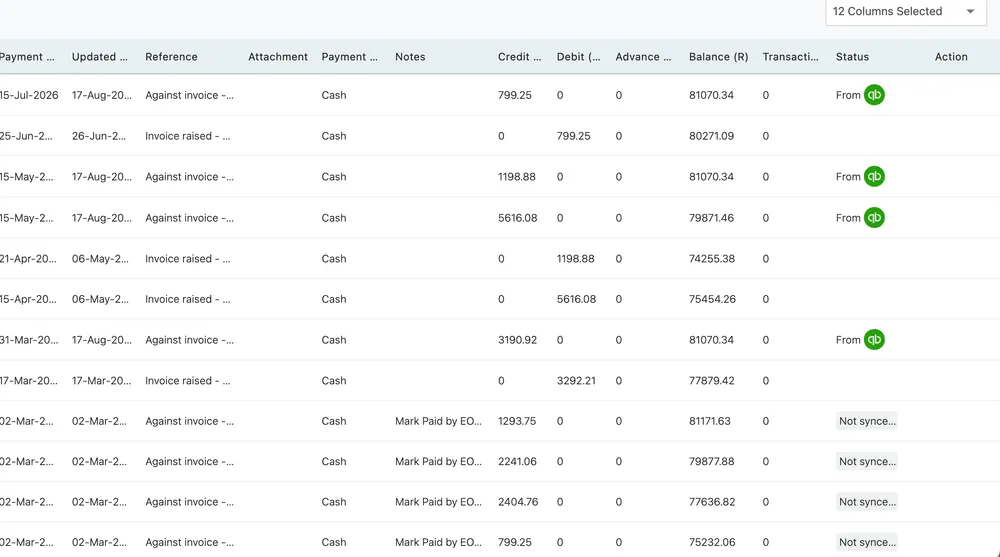
Payment → the ledger
Each row is one movement on the account.
| Column | What it holds |
|---|---|
| Payment Date | When the movement happened |
| Updated Date | When the row was last touched |
| Reference | What it was — an invoice raised, or a payment against one |
| Attachment | A receipt or remittance, if one was added |
| Payment Mode | Cash, card, transfer and so on |
| Notes | Anything recorded with the movement |
| Credit | Money in |
| Debit | Money out — an invoice raised against the client |
| Advance | Money taken before there was an invoice to put it against |
| Balance | What the account stands at after this row |
| Transaction fee | Anything the payment processor took |
| Credit Note | Money credited back against an invoice, with its own preview |
| Status | Whether the movement has reached your accounting package |
| Action | What you can do with the row |
12 Columns Selected chooses which of these are drawn.
Reading it
Section titled “Reading it”The two money columns are opposites, and getting them the right way round is the whole skill of reading this tab:
- A debit is an invoice being raised. You have billed them, so they owe you more.
- A credit is a payment arriving. They owe you less.
Balance carries the result down the page, so any row tells you what the account stood at on that date. When a client disputes a figure, this column is where you find the moment it changed.
The Reference on each row names the invoice the movement belongs to, which is how you tie a payment back to the document it settled.
The credit note document
Section titled “The credit note document”A credit note is raised from the invoice, but this is where the client’s copy of it lives. The ledger’s Credit Note column carries a Preview for the note on that row.
The preview names the invoice the credit was raised against, and carries Download and Send — the same pair as an invoice preview. So the client can be given the credit note as a document, by email or as a file, rather than being told about it in a covering note.
Client → Payment → Credit Note → Preview → Download or Send.
That matters when a client’s accounts department needs paperwork for the correction, not just a smaller balance: the credit note is the document that explains why the figure changed, and it names the invoice it belongs to.
Where money gets recorded
Section titled “Where money gets recorded”Payments reach this ledger from several places, and they all land here:
- Make payment on the Overview tab.
- Advance Pay in the record header, for money taken before an invoice exists.
- Against a specific invoice — see invoice payments.
- Through the client’s own Pay Now link on an invoice you sent them.