Payment Received Report
Payment Received Report is the money that has actually come in: one row per payment, with the invoice it was set against.
It is the counterpart to the Invoice Report. That one is what you asked for; this one is what arrived.
Open it from Add Report — see generating a report.
What comes back
Section titled “What comes back”
Reports → Payment Received Report
Total Amount is everything received in the period.
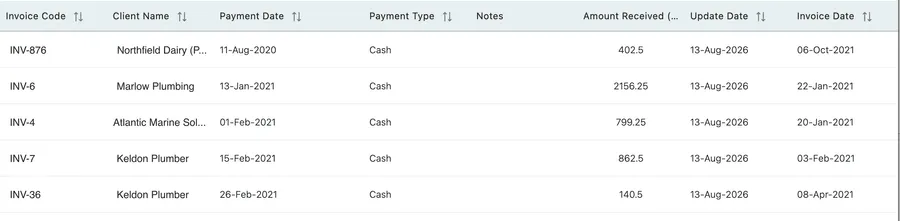
Reports → Payment Received Report
| Column | What it holds |
|---|---|
| Invoice Code | The invoice the payment was set against. |
| Client Name | Who paid. |
| Payment Date | When the money was taken. |
| Payment Type | Cash, card, transfer — see invoice payments. |
| Notes | Whatever was written on the payment, such as a reference. |
| Amount Received | How much. |
| Update Date | When the payment was recorded in EyeOnTask. |
| Invoice Date | When the invoice itself was raised. |
Three dates, and why they differ
Section titled “Three dates, and why they differ”A row can carry a Payment Date, an Update Date and an Invoice Date that are nowhere near each other, and each is answering a different question.
- Payment Date is when the client’s money moved.
- Invoice Date is when you billed them.
- Update Date is when somebody typed the payment into EyeOnTask.
A wide gap between Payment Date and Update Date means payments are being recorded long after they were taken. That is worth knowing before anyone treats the Client Receivable Report as current, because a debt settled weeks ago still reads as outstanding until the payment is entered.
Payment Date earlier than Invoice Date is a payment taken before the invoice was raised — a deposit, or an invoice written up after the work.
Using it
Section titled “Using it”Reconciling against the bank is the main use. Filter to the period, export, and match it against the statement — Payment Type is what lets you separate the cash from the transfers.
Checking a client who says they have paid is the other. Their payment either appears here, in which case you can tell them when and how it was recorded, or it does not, in which case the money has not been matched to an invoice yet.
Related
Section titled “Related”- Invoice payments — recording a payment against an invoice.
- Invoice Report — what was billed, and what is still due.
- Client Receivable Report — what each client still owes.