Parts on a piece of equipment
Some equipment is a single thing. A bullet camera is not — it is a housing, a lens module and an IR board, and when it fails it is one of those three that failed, not “the camera”.
Parts breaks a unit into the components inside it, so the thing you replace is the thing that is recorded.
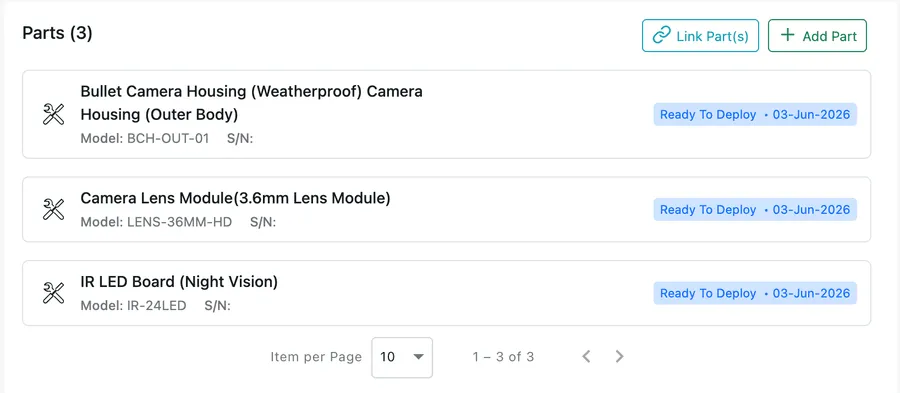
Equipment → the selected unit → Parts
What a part carries
Section titled “What a part carries”A part is tracked in the same way as the unit that holds it — its own model number, serial number, status and date. That is what lets you answer “when was the lens replaced?” without opening a single job.
Adding and linking
Section titled “Adding and linking”Two buttons sit above the list:
- Add Part creates a new component on this unit and asks for its details.
- Link Part(s) attaches something that already exists on your records, rather than creating a duplicate of it.
Use Link Part(s) when the component is already a unit in its own right — a spare you have been tracking since you bought it. Use Add Part when it only exists as part of this machine.
Equipment that is a part
Section titled “Equipment that is a part”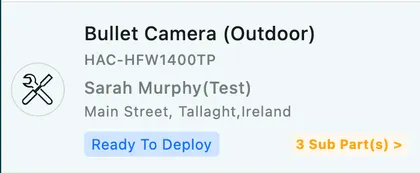
Equipment → Client’s Equipment
A unit with components shows a Sub Part(s) count in the list, which opens the parts underneath it.
The other side of this is the Equipment as a part tickbox on the add equipment form. Ticking it says this unit is a component — a housing, a compressor, a lens — rather than a machine somebody would call about on its own. The equivalent on a job is This is a part when adding equipment on site, and on an inventory item it is the Sub Item(s) relationship; see sub items and parts.
Removing a part
Section titled “Removing a part”Detaching a part does not destroy it. It stops being a component of that machine and goes back to standing on its own.
In the office, open the part’s own record, click Edit, and untick Equipment as a part. That is the same tickbox that made it a component, so clearing it is what releases it from its parent.
In the app, the fieldworker uses Detach on the part — which is the one that matters on site, because a component usually comes off a machine while somebody is standing in front of it. See equipment in the app.
The part keeps its own model number, serial number, status and history either way. Detaching changes what it belongs to, not what has happened to it.
Why bother
Section titled “Why bother”Parts are what make a service history worth reading. A job that says “replaced the IR LED board, serial IR-24LED” on a camera you have tracked for three years tells you the board is now under a fresh warranty and the housing is not — and the next engineer sees that before they drive out.