Predrafted contracts and packages
Most companies sell the same few agreements over and over. A predrafted contract is one of those saved as a reusable blueprint, so you never rebuild the same terms twice.
What a blueprint is, and what it is for
Section titled “What a blueprint is, and what it is for”If what you want is the layout the agreement prints in, that is a different thing with a confusingly similar name — see document templates, created under Settings → Templates → Contract Template. This page is about a contract that is filled in ahead of time, not about how one prints.
Blueprint and predrafted contract are the same thing — a contract saved with everything filled in except the client. It is a master copy, not a live agreement: it bills nobody, raises no jobs and has no term running against it. It sits and waits to be copied.
Its job is to take the repeat sale out of the setup. If you sell the same annual maintenance agreement forty times a year, you build it once as a blueprint. Each new client then starts from that copy — the billing terms, the rate card and the work patterns are already right — and all anybody fills in is the client, the dates and the equipment.
That is the whole idea in three steps:
- Build it once — the terms, the rate card, the schedule of work.
- Save it as a blueprint — either from a contract you already have, or from scratch.
- Copy it whenever you sell it — directly into a new contract, or through a quotation as a package.
You can save any contract as one from the footer, or start a fresh blueprint from Add pre drafted contract on the contracts list:

Add Contract, footer
What a predrafted contract holds — and what it can’t
Section titled “What a predrafted contract holds — and what it can’t”A blueprint is deliberately client-free, and its wizard is shorter because of it:

Add pre drafted contract
You cannot attach a client — and because equipment belongs to a client, equipment cannot be attached either. That is why the wizard drops to four steps: Contract Details, Billing Terms, Rate Cards, and Work Patterns / Jobs.
What it does keep is everything that makes the agreement what it is: the type and duration, the billing terms, the rate card with its quotas and rates, and the work patterns. Blueprints live on their own tab, marked as templates:
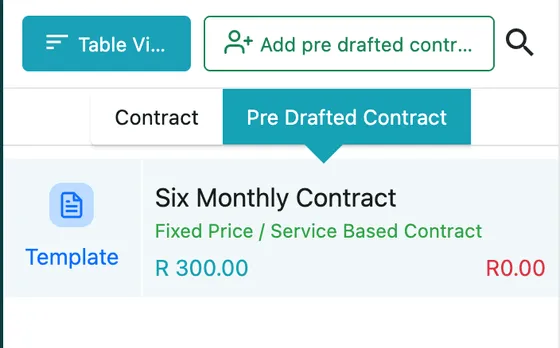
Contracts → Pre Drafted Contract tab
Using one
Section titled “Using one”There are two ways a blueprint turns into real work:
- Directly — when creating a contract, select the predrafted contract and the whole draft loads in. You then add the client, the dates and the equipment, and everything else is already defined.
- As a package on a quotation — this is the same blueprint wearing its sales hat. On a quote, Add Package lists your predrafted contracts; pick one, send the quote, and when the client approves it, convert it straight into a contract. The work patterns, services and items all carry across.
One package to a quotation
Section titled “One package to a quotation”A quotation carries one package. That follows from what the package is: a whole agreement, which the quote converts into a single contract when the client approves — two agreements on one quote would have nowhere to go.
It is rarely a limitation in practice. Anything the client is buying beyond the agreement goes on the same quote as ordinary item and service lines, and if they genuinely want two agreements, that is two quotes.
The price on the quote is the one that converts
Section titled “The price on the quote is the one that converts”Change a package’s rate on the quotation and that is the figure the contract is built with. The blueprint’s original price does not come back at conversion.
It follows from the copy: from the moment the package is added to the quote, the quote holds its own version of the agreement, and the blueprint has no further say in it. The contract is then built from the quote — so the amount on the contract is the amount the client was shown and approved, which is the only figure it could sensibly be.
That is what makes it safe to negotiate on a package. Discount it for one client, price it up for another, and each contract comes out at the number that client agreed to, with the blueprint untouched for the next sale.
One exception, and it is worth knowing before you quote. An equipment leasing blueprint billed per asset with more than one asset on it cannot take a single quoted figure — there is no basis for splitting one amount across several machines. The conversion warns you and keeps the blueprint’s per-asset rates instead. Leasing blueprints built on Custom amount have no such problem, and neither does a per-asset lease with one asset. See when the lease was sold as a package.
Editing the blueprint later
Section titled “Editing the blueprint later”A package is copied when it is used, not linked to what it produced. Change the blueprint afterwards — a quantity from 5 to 10, a new service, a different rate — and the quotes and contracts already made from it stay exactly as they were. What was quoted is what the client saw and agreed to, and it does not move under them.
The new version applies from the next use onward: the next quote you add the package to, and the next contract created from it, are built from the blueprint as it now stands.
So a blueprint is worth editing freely. Nothing already sold is disturbed, and if a live quote genuinely needs the new figure, put the package on it again or change the line by hand.
Since most companies’ packages are built on a fixed set of services, schedules and materials, this turns a repeat sale into a couple of clicks instead of rebuilding the same agreement each time.