Quote settings
Settings → Modules → Quotes → Default Settings.
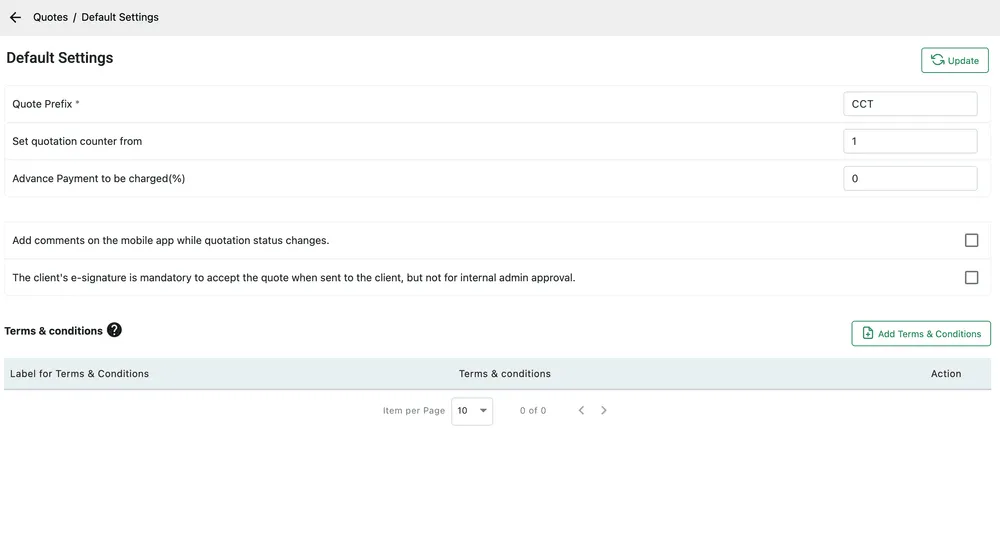
Settings → Modules → Quotes → Default Settings
| Setting | What it does |
|---|---|
| Quote Prefix | The letters in front of every quote number. Required. |
| Set quotation counter from | The number the next quote takes. |
| Advance Payment to be charged(%) | The deposit you ask for as a percentage of the quote. Set it here and every quote arrives asking for it. |
| Add comments on the mobile app while quotation status changes | Makes an engineer say why when they move a quote along, rather than only that they did. |
| The client’s e-signature is mandatory to accept the quote | The customer must sign to accept. Internal approval by an admin still works without one. |
The e-signature rule is worth reading carefully: it binds the client’s acceptance, not your own office’s. Your team can still approve a quote internally; what they cannot do is record the customer as having accepted it without a signature.
Update saves.
Terms and conditions
Section titled “Terms and conditions”Terms & conditions at the foot of the screen is a list of reusable blocks. Add Terms & Conditions creates one with a Label for Terms & Conditions — how you refer to it — and the Terms & conditions text itself.
Saving them here means picking the right set on a quote rather than pasting the same paragraphs in every time, and it means that when your terms change you change them once.
Ships empty.