Job completion form
The completion form is what a fieldworker fills in when the work is done. It is the same form on every job, and it is where the record of what actually happened comes from.
Settings → Customisation → Job Completion Form.
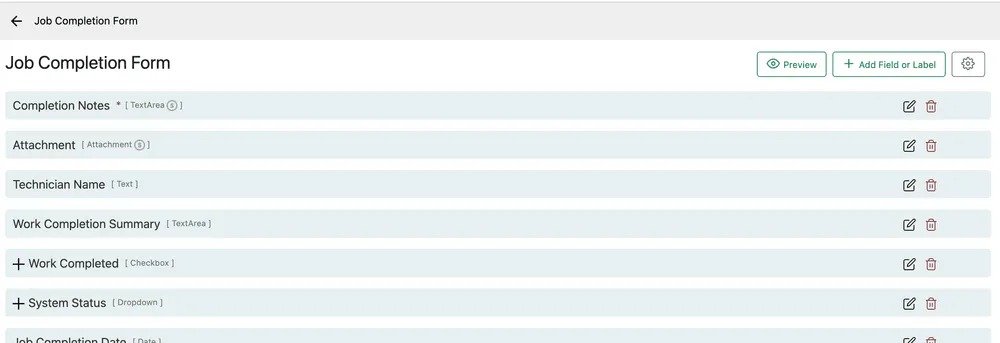
Settings → Customisation → Job Completion Form
Each row is a field, with its type in brackets. A red asterisk marks a field that must be answered before the job can be completed.
Add Field or Label adds a question; the pencil edits one; the bin removes it. Preview shows the form as the engineer will see it, and the gear in the corner holds the form’s own settings.
Editing a field
Section titled “Editing a field”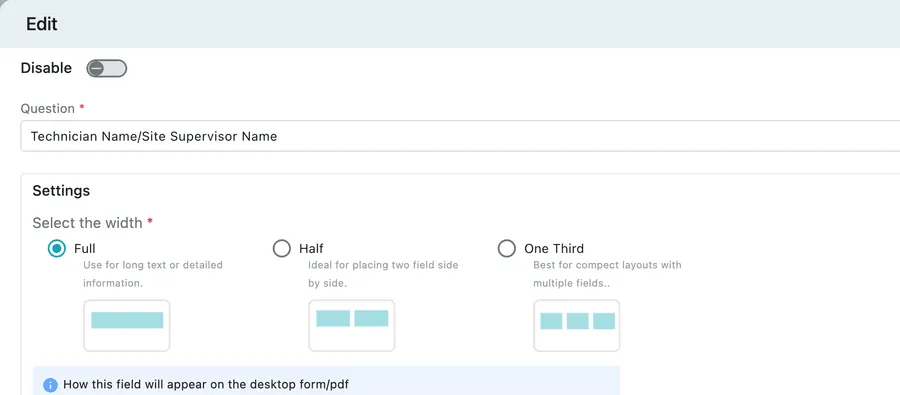
Settings → Customisation → Job Completion Form → edit a field
| Control | What it does |
|---|---|
| Disable | Takes the field off the form without deleting it or losing the answers already given. |
| Question | The wording the engineer reads. |
| Change Question Type | Switches it between text, dropdown, checkbox, date and the rest. |
| Select the width | Full for long text, Half to sit two fields side by side, One Third for compact rows. It sets how the field appears on the desktop form and on the PDF. |
| Mandatory | The job cannot be completed until this is answered. |
Update saves.
Width is about the printed job card too
Section titled “Width is about the printed job card too”The width setting is not only screen tidiness. It is how the field lays out on the job card your customer receives — three short answers across one row read as a summary, where the same three stacked full-width read as a form somebody had to fill in.
Mandatory, used sparingly
Section titled “Mandatory, used sparingly”Every mandatory field is a field standing between your engineer and the end of their day. Make the ones you would chase somebody about mandatory — the completion note, the customer’s signature, the photo of the finished work — and leave the rest optional. A form with fifteen required fields gets answered with a full stop in every box.
Related
Section titled “Related”- Finishing a job in the app — the engineer’s end of this form
- Job completion detail — where the answers appear in the office
- Additional forms — questions for particular kinds of work rather than all of it