Booking availability and company holidays
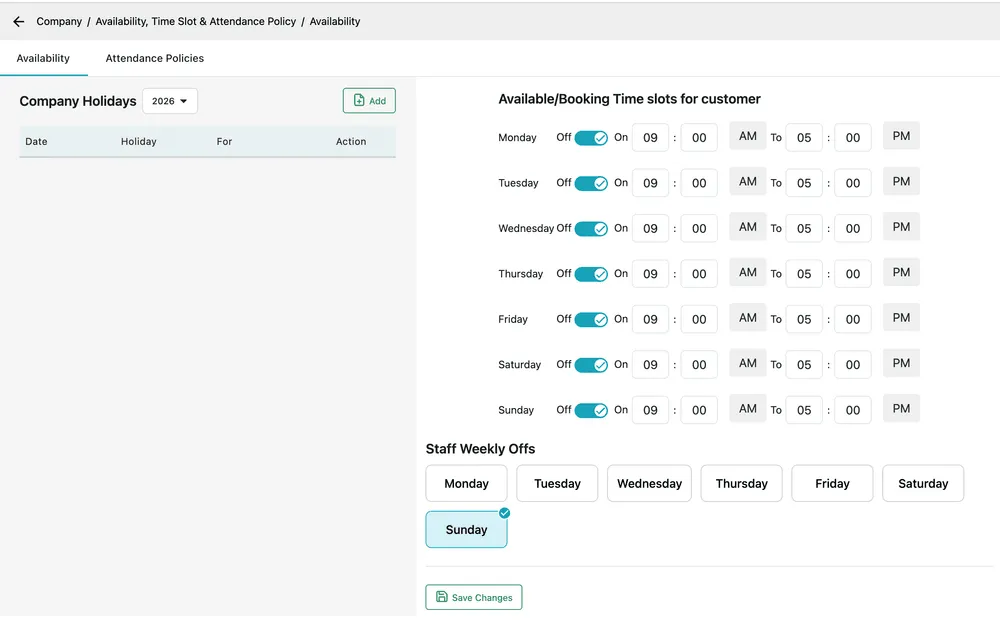
This screen answers one question in three ways: when are we open? It sets the hours a customer can book into, the individual days you are shut, and the day of the week your staff are off.
Settings → Company → Availability, Time Slot & Attendance Policy opens it, on the Availability tab.
Settings → Company → Availability, Time Slot & Attendance Policy
Booking time slots
Section titled “Booking time slots”Available/Booking Time slots for customer is your working week, a row per day. Each row has an Off/On toggle and a start and end time.
Switch a day Off and nothing can be booked into it. Leave it On and set the range — 09:00 AM to 05:00 PM — and that is the window customers are offered when they ask for an appointment through the customer portal or a request from your website.
Times follow the clock set on the company profile, so a company on the 24-hour format sees 17:00 here instead of 05:00 PM.
Company holidays
Section titled “Company holidays”Company Holidays on the left is the list of individual days you are closed, shown a year at a time — use the year dropdown above the table to move between them.
Add opens a dialog with:
| Field | What it is |
|---|---|
| Off Day Starts From | First day of the closure. |
| Off Day Ends On | Last day of it. A single day has the same date in both. |
| Name of Holiday | What it is called — Christmas Day, Annual shutdown. |
| For | Who the closure applies to: customers, staff, or both. |
For is the field that earns the screen. A day marked for customers closes the booking calendar but leaves your team working — useful for a day you are catching up on backlog. A day marked for staff stops the work while leaving the enquiry line open. Both is a genuine shutdown.
Save adds the holiday, and it appears in the table with its date, name and who it applies to.
Staff weekly offs
Section titled “Staff weekly offs”Staff Weekly Offs is a row of day buttons. Click a day to select it — a tick appears in its corner — and that day is the standing weekly day off for your staff. Sunday is selected in a typical week; select more than one for a business that closes at the weekend.
This is the recurring version of a company holiday: use holidays for particular dates, and weekly offs for every week.
Save Changes at the foot of the screen commits the time slots and the weekly offs together.
Attendance policies
Section titled “Attendance policies”The second tab on this screen, Attendance Policies, is about staff hours rather than opening hours — shift length, grace periods and what counts as late. It is documented with the rest of the people side of EyeOnTask, in attendance policies.