Email, SMS and WhatsApp templates
These three templates are the messages that go out while work happens — the customer told their engineer is on the way, the client sent their invoice, the office told a job was rejected.
Each is a list of triggers, one per event, with the wording you send when it fires.
Settings → Templates → E-mail Template.
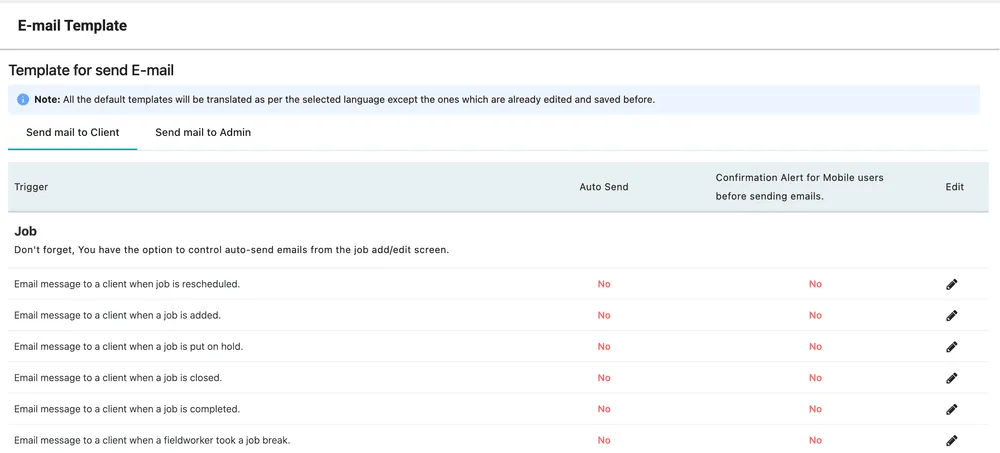
Settings → Templates → E-mail Template
The two tabs, Send mail to Client and Send mail to Admin, are two separate sets of messages: what your customer is told, and what your own office is told. The triggers are grouped by module — the Job group covers rescheduled, added, on hold, closed, completed, job break, in progress, travel break, travelling, cancelled, rejected, accepted, dispatched and feedback.
Each row shows:
| Column | What it means |
|---|---|
| Auto Send | Whether the message goes out by itself when the event happens. |
| Confirmation Alert for Mobile users before sending emails | Whether the engineer is asked to confirm before their action sends a mail to your client. |
| Edit | Opens the message. |
The second column exists because these messages are usually triggered by a fieldworker doing something ordinary. Turn it on and they get a say; leave it off and the mail goes without them knowing.
Auto-send can also be overridden per job, from the job add/edit screen — the screen says so itself.
Editing a message
Section titled “Editing a message”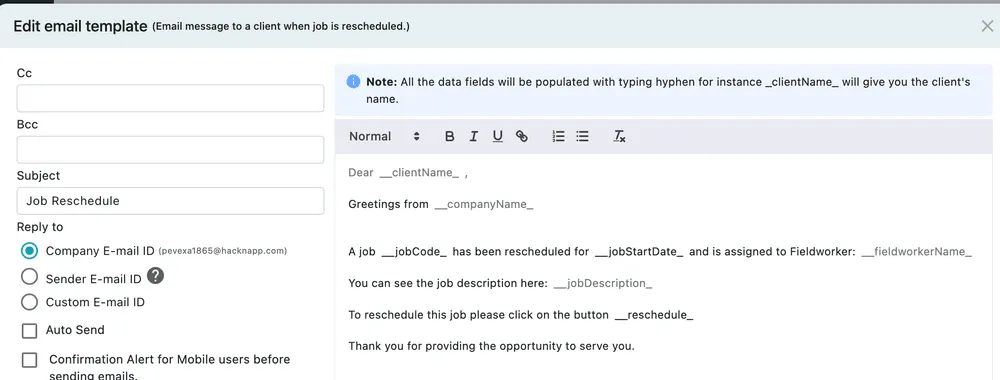
Settings → Templates → E-mail Template → edit a trigger
| Field | What it does |
|---|---|
| Cc, Bcc | Standing copy recipients for this message — how you have every one of these mails copied to yourself or to your accounts inbox, instead of typing an address in each time you send. |
| Subject | The subject line. |
| Reply to | Where replies go: your Company E-mail ID, the Sender’s own address, or a Custom E-mail ID. |
| Auto Send | The same switch as on the list. |
| Confirmation Alert for Mobile users | Likewise. |
The body is a rich text editor with bold, italic, underline, links and lists.
Data placeholders
Section titled “Data placeholders”The message body carries data fields that fill themselves in when the mail is sent — _clientName_ becomes the client’s name, _jobCode_ the job number, _jobStartDate_ the scheduled date, _fieldworkerName_ the engineer, _reschedule_ the button the customer clicks.
Type the underscore in the body and the available fields are offered. Placeholders are what makes one template serve every customer, so keep them intact when you rewrite the wording around them.
Reply-to is worth a thought
Section titled “Reply-to is worth a thought”Sender E-mail ID puts the individual engineer’s address on the reply. That is right for a message about one job and wrong for an invoice, where a customer replying should reach your accounts inbox rather than whoever happened to press send.
Settings → Templates → SMS Template.
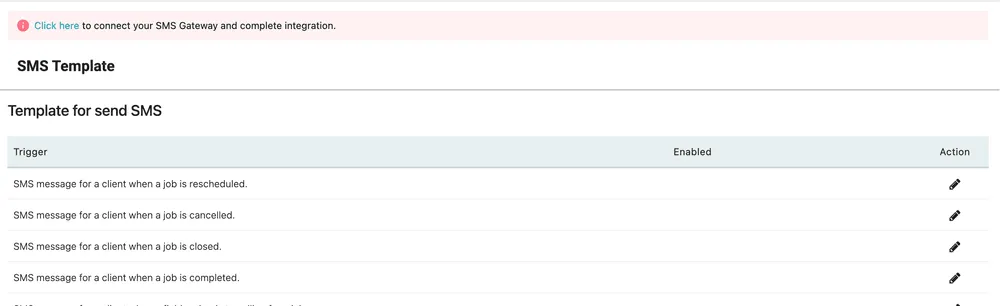
Settings → Templates → SMS Template
SMS works the same way — a list of triggers, each with wording you edit — with one condition: you need an SMS gateway connected first. Until it is, the banner at the top of the screen links to the integration, and nothing sends. See SMS gateway for connecting one.
The gateway is a third-party service you hold an account with; EyeOnTask sends through it. Text messages cost money per message, which is why they are not simply switched on for you.
Settings → Templates → WhatsApp Template.
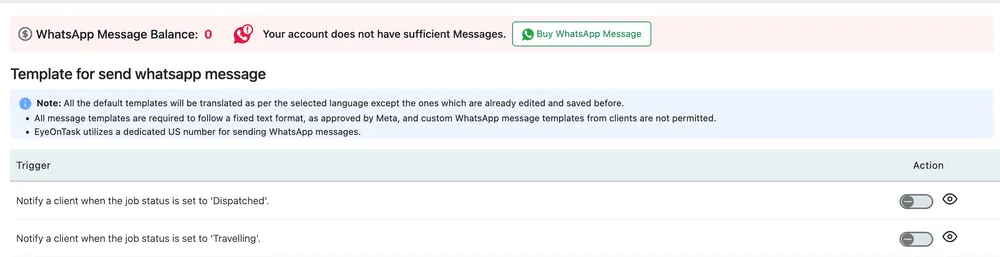
Settings → Templates → WhatsApp Template
WhatsApp has three constraints the other two do not:
- Messages are prepaid. The balance shows at the top, and Buy WhatsApp Message tops it up. At zero, nothing sends.
- The wording is fixed. WhatsApp templates must follow a text format approved by Meta, so custom message templates are not permitted. Each trigger has a switch to turn it on and an eye to preview what will be sent, but the words are not yours to change.
- The messages go from a dedicated US number, not from a number of yours.
Within those limits it is the most reliable of the three for reaching a customer who is out on site.
Language
Section titled “Language”Default templates are translated when you change the application language — except any you have already edited and saved, which keep your wording. Edit a template and you have taken responsibility for its translations.