Adding an audit
An audit is an inspection you schedule at a client’s site and send somebody out to carry out.
Audits are a Premium plan feature. See plans and pricing.
Where to find it
Section titled “Where to find it”Audits are part of Work, alongside jobs and appointments — the same list, split across tabs at the top. See finding your jobs.
That is the shape of the whole feature: an audit is treated as a job. It is scheduled, assigned and carried out the same way, and the job card that comes back is the inspection report.
So an audit is not a separate way of working, and you do not need one to run inspections. A company that schedules its inspections as ordinary jobs, with the checks written into the job instruction or an additional form, gets the same result: somebody goes, records what they found, and the job card is the record.
The form
Section titled “The form”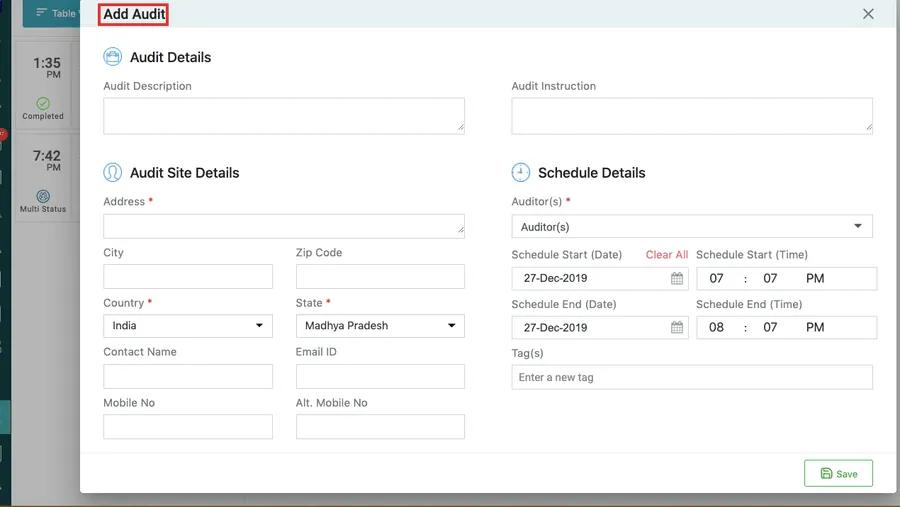
Inspection/Audit → Add Audit
The form is in three parts, and they answer three different questions.
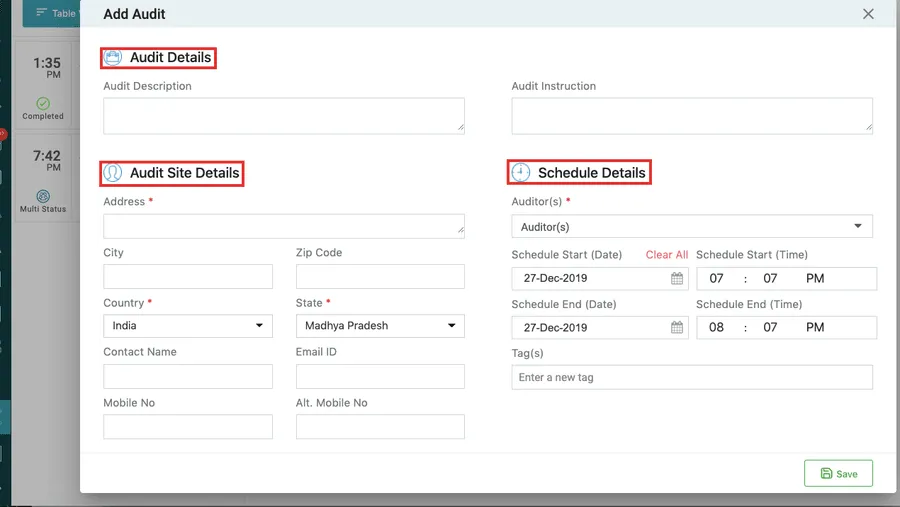
Add Audit → the three sections
| Section | What it holds |
|---|---|
| Audit Details | What the audit is — its description and the instruction for whoever carries it out |
| Audit Site Details | Where it happens — address, city, state, country, postcode, and the contact there |
| Schedule Details | When and who — the start and end date and time, the Auditor(s), and any tags |
Fields marked with an asterisk are mandatory and the form will not save without them.
Auditor(s) is a dropdown of the people who can carry an audit out; you can pick more than one for an audit that needs a pair.
Save adds the audit and confirms it. It then appears in the audit list.