Fixed price and service based contracts
Fixed Price / Service Based is the type you use when you are servicing a client — an AMC, a cleaning agreement, a maintenance contract. This page covers how its money works: what the client pays every period, and what makes anything else chargeable on top.
For the wider picture, start with how contracts work.
One type, not two
Section titled “One type, not two”The name has a slash in it because fixed price and service based are not two different contracts to choose between. There is one contract type, and one set of screens. Whether it behaves as a fixed-price agreement or a pay-per-service one comes out of two things you fill in:
| What you set | What it gives you |
|---|---|
| A recurring fee, and an empty rate card | Fixed price. The client pays the same amount every period and the work is included. |
| No recurring fee, and services on the rate card with rates | Service based. Nothing is billed until a job happens; each one is charged for what it was. |
| Both — a recurring fee and rate card entries | The common middle: a fixed fee that covers a set amount of work, with the rest charged on top. |
You are not picking a mode. You are setting two figures, and the combination is the agreement.
A plain fixed-price contract needs no rate card at all
Section titled “A plain fixed-price contract needs no rate card at all”This is worth saying on its own, because people go looking for something to fill in. For a straightforward fixed-price contract you do not have to define anything on the rate card. Set the fee, set the term, add the work pattern, and you are done — every job under the contract is included, however many there are.
Put something on the rate card only when you want that one thing treated differently:
- One service should be chargeable while the rest are included — put just that service on the rate card with a rate. Everything left off stays included.
- A set amount of work is included, and past it you charge — put the service on with a free quota. 1,000 a month, 12 services a year included, chargeable after that is one row on the rate card.
A fixed-price contract with a quota on it is still a fixed-price contract. The rate card is not a different kind of agreement; it is where you write the exceptions to “it is all included”.
A service-based contract does not need a recurring fee
Section titled “A service-based contract does not need a recurring fee”The other way round works too. Put the services on the rate card with their rates and leave the recurring fee out, and the client pays only when work happens — every job raised for that service is chargeable.
Keeping a recurring fee as well is perfectly normal, and that is the middle row above: a standing charge, plus per-job charges for whatever the standing charge does not cover.
The rest of this page is the detail behind those three lines.
The recurring fee
Section titled “The recurring fee”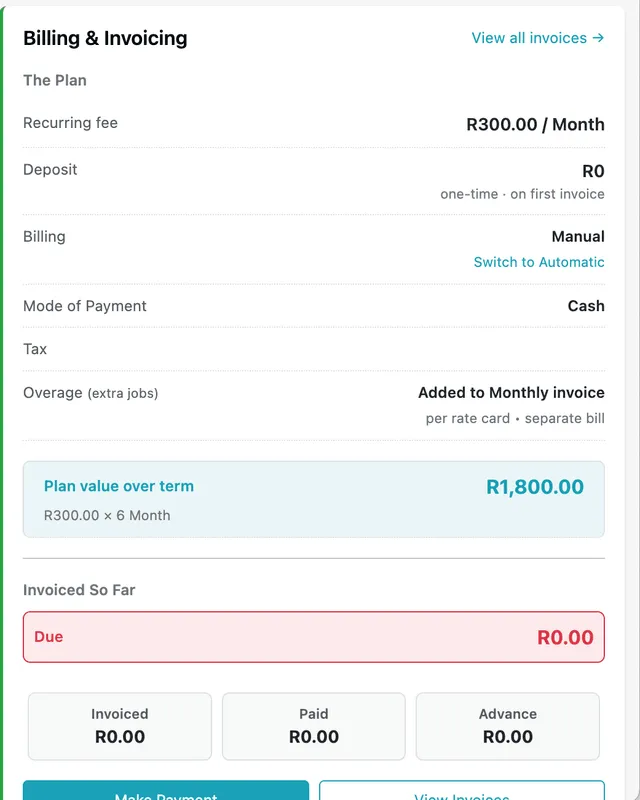
Contract page → Billing & Invoicing panel
You set a recurring fee and a billing frequency, and the client is billed that amount every period. Tax is applied when the invoice is raised.
The frequencies on offer are Weekly, Fortnightly, Monthly and Half-Yearly. That is the whole list — a cycle of your own, every 15 days or every 40 days, cannot be set up to run automatically. Fortnightly is the closest thing to a fifteen-day rhythm; if the agreement genuinely needs its own interval, switch the contract to manual invoicing and raise each invoice when it is due.
Tax on a contract
Section titled “Tax on a contract”The rate card offers Apply Taxes from Master List, and the master list is your saved services and items themselves. Every one of them is stored with its own tax choice, made when it was added: Choose Tax on an inventory item, No Taxation / Select Taxation on a job type/service.
So there is nothing to pick on the contract. Turn the option on and each line the rate card prices carries whatever tax its own record was saved with — an item saved as No Taxation stays untaxed, one saved at VAT 23% is taxed at 23%. Leave the option off and there is no tax to choose on the contract at all.
If a line comes out with the wrong tax, the place to change it is the item or service record rather than the contract. The rates those records offer are defined once under tax rates.
A deposit is kept as its own figure and never rolled into the recurring amount. This is the joining fee pattern you see in internet and AMC agreements: 200 to set the connection up, then 100 a month — bill the deposit with the first month and the client’s first bill is 300, with every one after it 100.
It is charged once, but not necessarily on the first invoice. On automatic invoicing it lands on the first invoice by itself. Raising invoices by hand, it is offered in Fetch & Link and you tick it when you want it — leave it off the first and it is still there for the second.
Either way, what decides its fate is whether it has been used, not which invoice it is. Take it off the first invoice — even one the system raised automatically — and it moves to the next one. Once it has actually been charged, it stops being offered anywhere.
The panel also totals the whole agreement for you: a fee of R300 a month over a six-month term shows as a plan value of R1,800.
Plan value is a total, not a limit. It is what the fee comes to over the term, and nothing is measured against it. Overage, extra jobs and items beyond their quota all bill on top, so a contract routinely invoices more than its plan value over a year — EyeOnTask does not cap the billing at that figure, and does not warn you when it passes it.
Changing the fee part-way through
Section titled “Changing the fee part-way through”Edit Contract changes the recurring fee at any point in the term, including after the contract has been billing for months.
It applies forward, not backward:
- Invoices already raised keep the amount they were raised at. Nothing is recalculated or adjusted behind you.
- The next invoice uses the new fee, from the next period onward.
- Plan value is recalculated straight away, on the new fee.
If the client is owed something back for a period already billed, that is settled on the invoice rather than on the contract: raise a credit note against it, or edit the invoice itself if no payment has been taken yet.
One thing to know before you change it: the contract keeps no record of what the fee used to be. Afterwards there is nothing on the contract explaining why January’s invoice was higher than March’s, so if the drop is a concession or a renegotiation, write it into the contract’s notes or the client’s record while you are making the change. Otherwise the answer lives only in the invoices themselves.
Fetching the quote’s lines
Section titled “Fetching the quote’s lines”Where the contract came from a quotation, Fetch in the top right of the Rate Cards section brings that quote’s items onto the card, rather than making you type them again.
Fetching is how a one-off price becomes a standing one. You sold that filter once, at a price the client has already agreed to. Put it on the rate card and the price is remembered: the next time one is fitted, on any visit the contract raises, it is charged at what you both settled on rather than looked up again or argued over.
The lines arrive editable, so a price that was only ever right for the first sale can be changed before you save — but the common case is wanting exactly what was quoted, which is what the button is for.
Everything on the quote is offered — items and services, consumable or not. Most of what you keep will be consumables, since those are what a visit uses up, but a spare part with an agreed price is a fair thing to have on the card too. What does not belong there is the unit the contract exists to service; that goes on as equipment. Untick what you do not want before saving.
The rate card decides what can be charged at all
Section titled “The rate card decides what can be charged at all”This is the single most important rule in a contract, and it catches people out: a service only becomes chargeable if it is on the rate card.
It is also why an empty rate card is a working setup rather than an unfinished one — with nothing on it, nothing is chargeable, which is exactly what a fixed-price agreement means.
To see why, look at what happens on a job. On the Create New job screen below, the job has been put under contract CON-91 and two services picked under Job Type/Services:
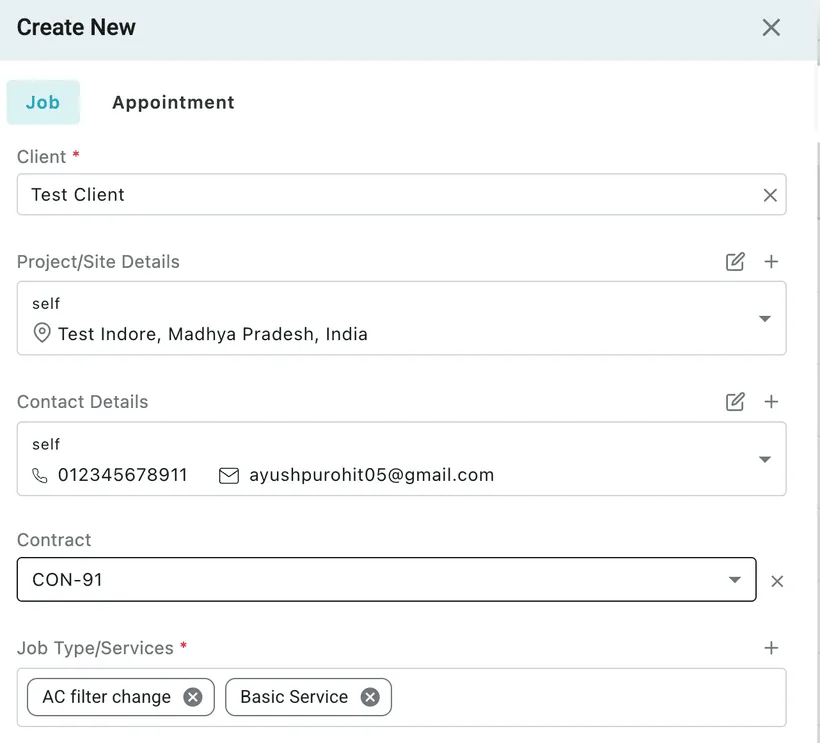
Create New job screen
Selecting them tells the fieldworker what to go and do. It does not put anything on the bill — the job’s cart, which is what actually reaches the invoice, is still empty:
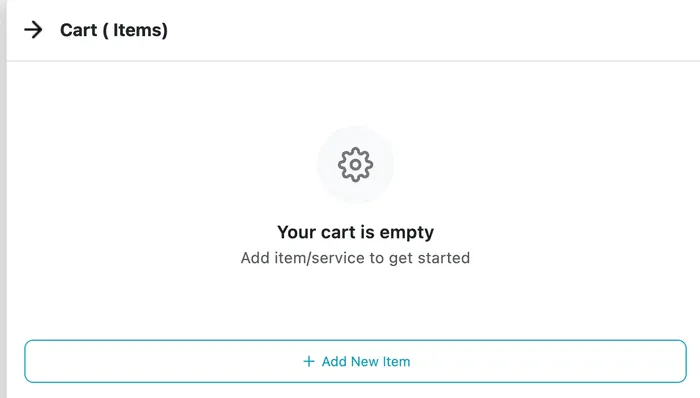
Create New job screen → Cart tab
Add the service to the cart and it becomes a priced line:
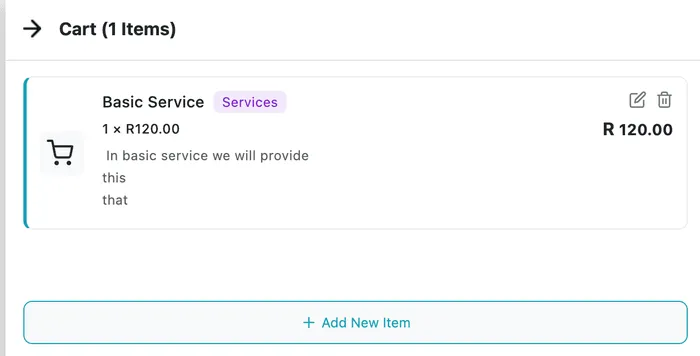
Create New job screen → Cart tab, after adding the service by hand
That manual step is exactly what the contract’s rate card automates. Put a service on the rate card, and selecting it on a job drops it into the cart on its own. Leave it off, and it stays a to-do that somebody would have to add by hand.
It takes both: on the rate card, and picked on the job
Section titled “It takes both: on the rate card, and picked on the job”The rate card does not charge anything by itself. Two things have to line up before a service bills automatically — it is on the contract’s rate card, and it is selected on the job under Job Type/Services.
| On the rate card? | Picked on the job? | What happens |
|---|---|---|
| Yes | Yes | The service drops into the job’s cart on its own and carries through to the invoice. |
| No | Yes | The service stays a to-do — an instruction that the work needs doing. Nothing reaches the cart by itself, so nothing bills automatically. |
| Yes | No | Nothing. The rate card is a price list, not a standing charge. If nobody picked that service on the job, that work was not done, so there is nothing to bill. |
The third row is the one worth reading twice. Putting Cleaning on the rate card does not mean every job under the contract carries a cleaning charge. It means that when a job has cleaning on it, the charge is worked out from the rate card. A job under the same contract that never mentions cleaning bills nothing for it.
The two conditions are tested per service, not per job, so a job carrying both kinds behaves as both: pick Cleaning (on the rate card) and Window repair (not on it) on the same job, and cleaning goes to the cart while the window repair stays a to-do beside it.
Once a service is in the cart, its free quota decides the rest — an included line at zero, or a charge (see below).
Items work slightly differently, because an item never has a to-do stage. You put a part into the job’s cart yourself — see items and services on a job — so it is a priced line from the moment it is added. What the rate card decides for an item is therefore the price and the quota, not whether it reaches the cart. On the rate card, it takes the contract rate and counts against its free quota; off it, it takes your master rate and is charged in full.
Checking before you invoice
Section titled “Checking before you invoice”There is one place that answers “will this bill?”, and it is the job’s cart — not the rate card, and not the services picked on the job. Open the job and look:
- A line in the cart — that is going to the invoice, either at zero if the quota covers it or at the contract rate if it does not.
- An empty cart — nothing on this job will bill, whatever the job type says. If that is wrong, the cause is one of the three rows above.
Work patterns follow the same rule
Section titled “Work patterns follow the same rule”A work pattern does not get a special path to the invoice. The jobs it generates carry whatever job types the pattern was built with, and those job types are tested against the rate card exactly as an ad-hoc job’s are.
So if the pattern raises jobs for a service that is on the rate card, those jobs bill automatically — inside the quota as included lines, beyond it as a charge. If the pattern raises jobs for a service that is not on the rate card, they arrive as to-dos, get done, and add nothing to the bill.
Both conditions still apply. A service on the rate card that the pattern never asks for is charged on nothing, because no job ever carried it.
Changing the rate card after a job exists
Section titled “Changing the rate card after a job exists”A rate card change applies to jobs raised after it. Jobs that already exist are left as they are.
That is deliberate: a job’s cart is decided when the job is created, from the rate card as it stood at that moment. Later edits to the contract do not reach back and reprice work that has already been booked in.
| What you change | Jobs already created | Jobs created afterwards |
|---|---|---|
| Add a service to the rate card | Nothing changes. The service is still a to-do on those jobs, and still has to be added to the cart by hand if you want it billed. | The service drops into the cart on its own, when the job has it selected. |
| Change a rate | Keep the price they were created with. | Use the new rate. |
| Change a free quota | Keep the cart lines they have. | Counted against the new quota. |
| Remove a service from the rate card | Keep whatever is already in their cart. | Back to a to-do — nothing bills automatically. |
If you do want an existing job to pick up the change, you do it on the job rather than on the contract: open it, use Edit Job, and add the line to the cart yourself. See job actions. Check the rate on the line while you are there — a line you add by hand is priced as you enter it.
Watch out for jobs already generated ahead of time
Section titled “Watch out for jobs already generated ahead of time”“Already created” catches more jobs than people expect. A work pattern produces its jobs in advance — how far ahead is Advance day for recur pattern in work settings — so at the moment you edit the rate card, some jobs dated next week or next month may already exist.
Those count as existing jobs. They keep the carts and prices they were created with; only the ones the pattern raises after your change use the new rate card. If the change has to reach them, edit each of their carts by hand.
The practical order, then, is rate card first, jobs after. Set the contract’s rate card up before the work pattern starts producing jobs, and none of this comes up.
Which price gets used
Section titled “Which price gets used”The rate card does a second job as well: it sets the price.
- Something on the contract’s rate card bills at the contract rate — the price you agreed with this client.
- Something not on the rate card can still be billed; you just have to add it to the cart yourself. It then bills at your master rate — the standard price from your service and item lists.
So leaving something off the rate card does not make it free or un-billable. It makes it manual, and priced at your standard rate rather than this client’s negotiated one.
All of this works the same way whether the job came from a work pattern or you raised it ad-hoc, and it applies to inventory items and materials exactly as it does to services.
A rate reaches only the jobs of its own contract
Section titled “A rate reaches only the jobs of its own contract”A rate card belongs to one contract, and its prices go no further than the jobs raised under that contract. It is not a price attached to the client, and not one attached to the fieldworker who does the work.
So a client with two contracts running gets two sets of prices. The same service can sit on both rate cards at different rates, and each job takes the rate of the contract it was raised under — the same engineer, the same client, the same service, two different prices, and nothing wrong with any of it. A job raised under no contract at all takes your master rate.
Scheduled work does not add to the fee
Section titled “Scheduled work does not add to the fee”The jobs your work pattern generates are exactly what the recurring fee already pays for. Where their service is on the rate card and still inside its free quota, they appear on the invoice as included lines at zero — visible, so the client can see the work was done, but not charged.
Only work beyond what’s included gets added
Section titled “Only work beyond what’s included gets added”Every service and item on the rate card carries a free quota and a rate beyond that quota.
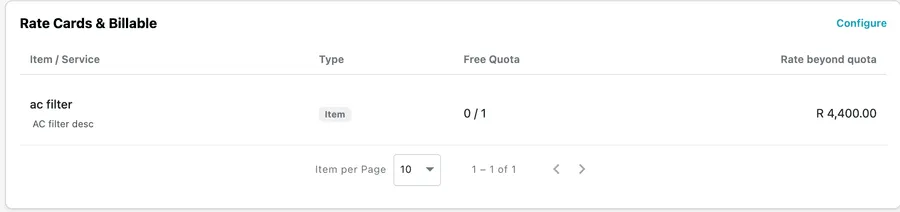
Contract page → Rate Cards & Billable
- Usage inside the quota is included — it shows on the invoice at zero.
- Usage beyond the quota is charged at the contract’s rate, and added onto that same period’s invoice. This is what the billing panel calls overage.
- Mark a row Unlimited and it is never charged.
- Set the quota to 0 and it is charged from the very first unit.
A service can only carry a free quota if its duration is 1. Service duration in hours is set on the service itself, under job type/services — set it to anything above 1 and the rate card will not let you give that service a free quota. If the quota field will not take a value, that is the setting to check first. The service can still go on the rate card and be charged at its contract rate; it is the free allowance that is unavailable.
Doing the same thing more than once on one job
Section titled “Doing the same thing more than once on one job”A service line is always a quantity of one. You cannot put a service on for 3 and have it count as three, so repeating the work means repeating the line — add the service to the cart once for each time it was done.
A job where the same service is performed three times therefore carries three separate lines, and each takes a single unit off the allowance. On a service with a free quota of 3 that uses the lot: three included lines at zero, nothing left, and no overage. The fourth, whenever it comes, is the one that charges.
Items are not restricted this way. An item line carries a real quantity, and that quantity is what counts against the quota — five of a part on one line is five units, not one.
Most rate card items are consumables, because most of what a visit uses is used up: filters, cartridges, cleaning fluid. The monthly filter change comes off the rate card every time the pattern raises a job — at the contract rate, or at zero while the free quota lasts.
A non-consumable can sit there too, and it is not a mistake. Putting a part on the rate card only settles what it costs if it is ever fitted; nothing is charged until somebody puts it in a job’s cart. So an adapter that is replaced once in three years belongs on the card as a price you have already agreed with the client, rather than as a price argued over on the day.
What does not belong there is the unit the contract exists to look after. The RO itself is equipment on the contract — one unit with a serial number and a service history — not a line to be sold again each period.
Billable and the quota
Section titled “Billable and the quota”Quota pays for the lines you are not charging for. A line covered by the allowance goes onto the invoice at zero — the client is not billed, and the contract’s balance is one unit shorter.
Tick Billable on such a line and you have changed your mind about that: the client is being charged for it after all, so the allowance is not being spent on it. The unit goes back to the contract, and the line is charged like any other.
It charges at the contract rate, not your standard one. The rate card comes first on a job under a contract — the price you agreed with this client is the price, whether the line is covered by the quota or charged. Only something the rate card does not mention falls back to your master rate.
It is worth knowing when a quota looks wrong. A balance that has gone up on its own usually means somebody made a line billable, which is the system doing what it should.
Copying a job or an invoice
Section titled “Copying a job or an invoice”A copy is treated as new usage, not as a duplicate of the old one. Copy a job or an invoice that carried quota lines and those lines keep their quota status on the copy — they are still the contract’s included work, and they still show at zero.
What they do as well is consume more quota. The copy draws on the balance that is left, exactly as the original did, so copying a visit that used two of a twelve-visit allowance takes the count to four.
If the allowance has already run out by the time you copy, there is nothing left to give: those lines bill at the contract rate instead of at zero.
Getting quota back
Section titled “Getting quota back”Quota follows the cart. What has been consumed is whatever the lines on the contract’s jobs and invoices currently say — a service line is one unit, an item line is its quantity — so changing those lines changes the balance, and it does so the moment you save.
- Reduce an item’s quantity, on the job or on the invoice, and exactly that many units go back. Take a line of 5 down to 2 and the contract gets 3 back.
- Remove a line and everything it held returns — for a service, that is the only way to give a unit back, since its quantity is fixed at one.
- Delete the job and everything its cart held is freed at once.
The balance updates as soon as the job or invoice is saved; there is nothing to recalculate by hand.
Cancelling a job returns nothing. A cancelled job still exists, and its cart still holds the lines that consumed the quota. If a visit is called off and you want the allowance back, delete the job or clear its cart rather than only marking it cancelled.
The same rule applies to inventory items and materials, not just services.
A worked example
Section titled “A worked example”Take a monthly cleaning contract:
| Setting | Value |
|---|---|
| Recurring fee | 100 / month |
| Rate card service | Visit — free quota 12 per contract, 40 beyond |
| Work pattern | One visit a month |
The work pattern creates twelve jobs across the year, and the client is billed:
- A normal month — 100. The scheduled visit falls inside the free quota, so it appears on the invoice as an included line at zero.
- A month with an extra visit — 140. That thirteenth visit is beyond the quota, so it is charged at 40 and rides along on the same month’s invoice.
Materials behave identically: an item used within its quota is included, and anything beyond it is added at the contract rate.
Note that this example only works because Visit is on the rate card. That is what lets the visits reach the invoice at all — first as included lines, then as a charge once the quota runs out.
The same rules, three different agreements
Section titled “The same rules, three different agreements”This is the section above in full. Because the rate card is the gate, what you put on it — or leave off it — turns the same screens into a different commercial agreement.
Everything included — a fixed-price contract. Leave the service off the rate card, which is what an empty rate card does for every service at once. Now however many call-outs happen in a month, each job is recorded, done and closed, and none of them adds anything to the bill. When you raise the invoice and look for jobs to bill, they simply do not appear as chargeable items. The client pays the agreed fee and nothing more.
“Unlimited support, 5,000 a month.” Log as many visits as the client needs — the invoice is 5,000 every month regardless.
Pay per visit — a service-based contract. Put the service on the rate card with a rate, with or without a recurring fee behind it. Now every job for that service automatically carries its amount into the job’s items, and the invoice for that period picks all of them up. The total moves with how much work actually happened.
“Call-outs at 800 each.” Three visits in a month bills 2,400; a quiet month bills less.
And the middle ground, which is the worked example above: a fixed fee that covers a set number of visits, with anything past that quota billed on top — 1,000 a month with twelve services included, chargeable after that.
Between these three shapes you can model most service agreements any industry runs on, and nothing stops you mixing them inside one contract: some services on the rate card, some left off, a quota on one of them.
Putting it together: a full contract
Section titled “Putting it together: a full contract”Everything above meets in one place. Here is a complete AMC, from setup to the invoices it produces.
The agreement. A client has three air conditioners. You will service them quarterly for a year, at a fixed monthly fee, with a joining fee up front.
| Setting | Value |
|---|---|
| Type | Fixed Price / Service Based |
| Term | 1 Jul 2026 → 30 Jun 2027 |
| Recurring fee | 1,000 / month, billed monthly, Automatic |
| Deposit | 2,000, one-time |
| Equipment | The client’s three AC units, linked |
| Work pattern | AC service, every 3 months — four visits across the term |
| Rate card — service | AC service: free quota 4, then 900 each |
| Rate card — item | AC filter: free quota 4, then 250 each |
| Not on the rate card | Emergency call-out |
What the client is billed.
- July — the first invoice carries the fee plus the one-time deposit: 3,000.
- August to June — 1,000 a month.
- The four quarterly visits — the work pattern creates them, the technician arrives with the three AC units already attached to the job, and each visit sits inside the free quota. They appear on the invoice as included lines at zero, so the client can see the work was done without being charged for it.
- A fifth visit in March, because one unit is playing up. That one is beyond the quota, so it is charged at 900 and rides along on March’s invoice. A fifth filter is fitted on the same visit, beyond its quota too: +250. March comes to 2,150.
- An emergency call-out in November. The job is created, done and closed — but Emergency call-out is not on the rate card, so nothing reaches November’s invoice. If you decide it should be charged after all, add it to the job’s cart and it bills at your master rate.
Over the year that is 14,000 of agreed money (twelve months plus the deposit) and 1,150 of extras, all of it landing on the invoice for the month it happened in.
Change one thing and it becomes a different business. Take AC service off the rate card and the visits stop being countable — the client pays 1,000 a month no matter how often you come out. Remove the recurring fee and put a rate on every service instead, and you are billing per visit. The screens do not change; the rate card does.