Expenses Report
Expenses Report is every expense raised over a period, in one list: what it was, what it cost, which job it belongs to, and whether the money has gone back out yet.
Expenses arrive from several directions — a fieldworker claiming fuel on the app, a cost recorded against a job, a subcontractor’s invoice entered by the office. On their own screens they are separate piles. Here they are one.
Open it from Add Report — see generating a report.
What it asks for
Section titled “What it asks for”
Reports → Expenses Report
Only Date Range is required. The rest narrow, and each has its own Clear:
- Expense Type and Category — what kind of cost it is. Categories are yours to define, in expense categories and groups.
- Client — expenses attached to one client’s work.
- Status — where the claim has got to. This is the filter that turns the report into a to-do list.
- User(s) — whose claims.
- Show Column — which of the nine columns to carry.
What comes back
Section titled “What comes back”
Reports → Expenses Report
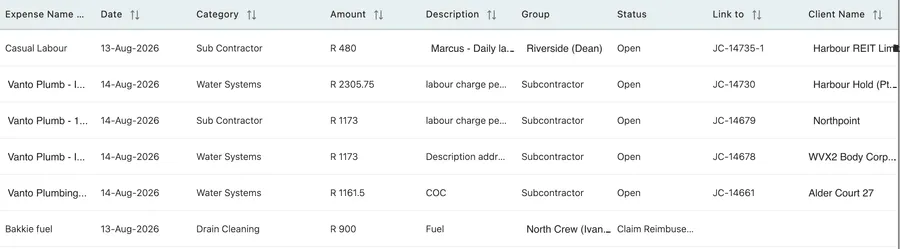
Total Amount is the period’s spend, and the table is what it is made of.
Reports → Expenses Report
| Column | What it holds |
|---|---|
| Expense Name | What was bought, or who it was paid to. |
| Date | When it was incurred. |
| Category | The category it was filed under. |
| Amount | What it cost. |
| Description | The free-text note on the claim. |
| Group | The crew or grouping it belongs to — see expense categories and groups. |
| Status | Open, Claim Reimbursed, and the rest of the approval path. |
| Link to | The job the expense sits against. |
| Client Name | Whose work it was for. |
The two columns that matter most
Section titled “The two columns that matter most”Link to is the one to read first. An expense linked to a job is a cost with somewhere to go: it can be recovered on that job’s invoice, and it lands in that job’s profitability. An expense with Link to empty is a cost the business is simply carrying — sometimes correctly, as with a fuel card or a workshop consumable, and sometimes because nobody said which job it belonged to.
A period with several unlinked rows is worth ten minutes. Each one is either genuine overhead or money that should have been billed.
Status is the other. Filtered to Open, the report is the list of claims your people are still waiting on — see approving and paying an expense. Run weekly and saved under a name, it is how expense claims stop drifting.
Related
Section titled “Related”- How expenses work — the module, and where claims come from.
- Expenses on jobs and clients — attaching a cost to work, and recovering it.
- Job profitability — where a linked expense ends up.
- A user’s expenses and leave — one person’s claims, on their own record.