A client's quotes and invoices
Two tabs sit next to each other on the client record and read as a pair: Quotation is everything you have offered this client, and Invoice is everything you have actually billed them.
The Quotation tab
Section titled “The Quotation tab”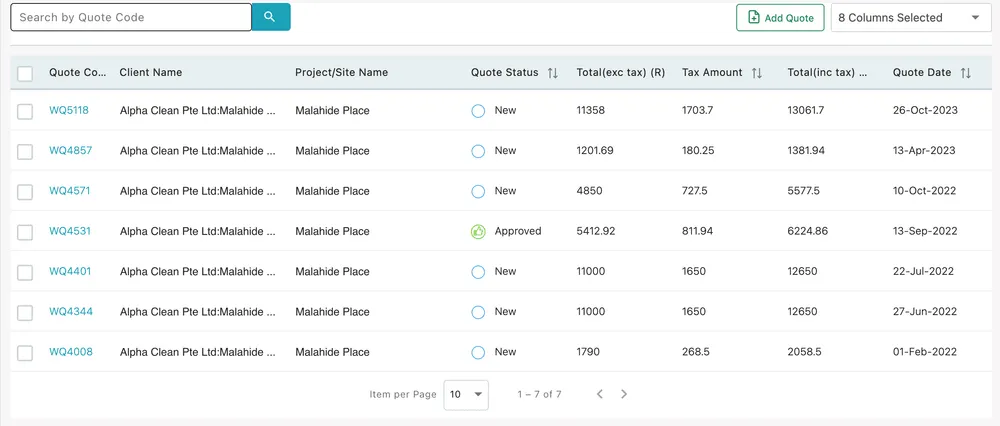
Clients → the selected client → Quotation
Every quote raised for this client, newest first.
| Column | What it holds |
|---|---|
| Quote Code | The quote’s reference — click it to open the quote |
| Client Name | The client and site it was raised for |
| Project/Site Name | The site the work is at |
| Quote Status | New, Sent, Approved, Reject, Revised Request or On Hold |
| Total (exc tax) | The quoted lines before tax |
| Tax Amount | The tax on them |
| Total (inc tax) | What the client would owe |
| Quote Date | When it was raised |
The arrows beside a heading sort by it, which is how you find the biggest open quote or the oldest one nobody has chased.
Add Quote, top-right, raises a new quote with this client already filled in. 8 Columns Selected chooses which columns are drawn.
Reading down the Quote Status column is the useful habit here. A column of New against a client you have been quoting for months is a list of things that were never sent. What each status means, and what changes it, is in how quotes work.
The Invoice tab
Section titled “The Invoice tab”
Clients → the selected client → Invoice
Three figures head the tab: Total Invoice Amount, Paid Amount and Due Amount — everything billed, everything collected, and the gap between them.
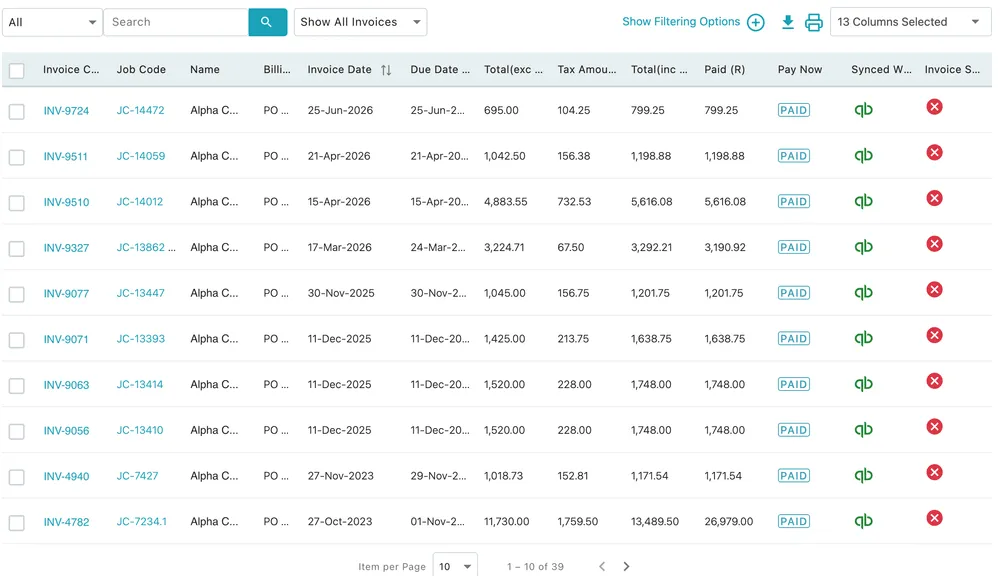
Invoice → the invoice table
| Column | What it holds |
|---|---|
| Invoice Code | The invoice’s reference — click it to open the invoice |
| Job Code | The job it was raised from, also clickable |
| Name | The client it was billed to |
| Billing type | How the invoice was billed |
| Invoice Date and Due Date | When it was raised and when it falls due |
| Total (exc tax), Tax Amount, Total (inc tax) | The money |
| Paid | How much has come in against it |
| Pay Now | A PAID badge when it is settled, or a link the client can pay through |
| Synced With | The accounting package the invoice has been pushed to |
| Invoice Sent | Whether it has actually gone to the client |
Invoice Sent is the column people miss. A cross there is an invoice that exists in the app and has never reached the customer — which is a different problem from an invoice that is simply unpaid, and a much easier one to fix. See sending an invoice.
Around the table: Show Filtering Options opens the filters, the download and print icons take the list out of the app, and 13 Columns Selected chooses the columns.
Where to go next
Section titled “Where to go next”- How quotes work — reading a quote, its statuses, and what happens when the client replies
- How invoices work — the invoice page, line items and the money
- Invoice payments — recording what comes in against an invoice
- A client’s payments — the same money as a running ledger