Job suggestions
A suggestion is wording written once and offered every time. It saves your office typing the same job description for the hundredth time, and it saves your engineers inventing a completion note at the end of a long day.
Settings → Modules → Work → Job Suggestion.
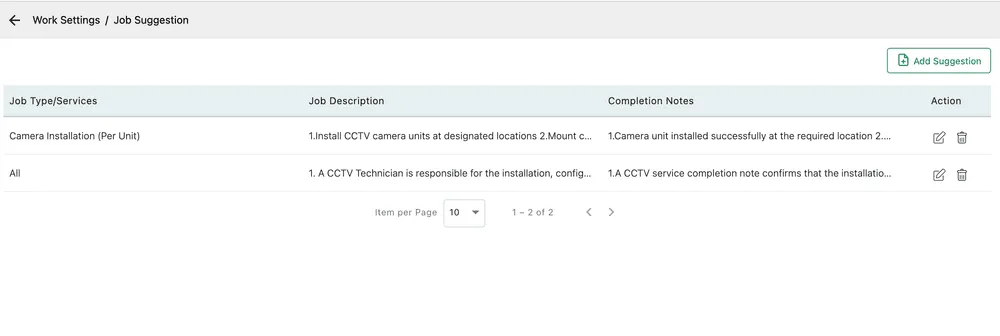
Settings → Modules → Work → Job Suggestion
Adding one
Section titled “Adding one”Add Suggestion opens the dialog.
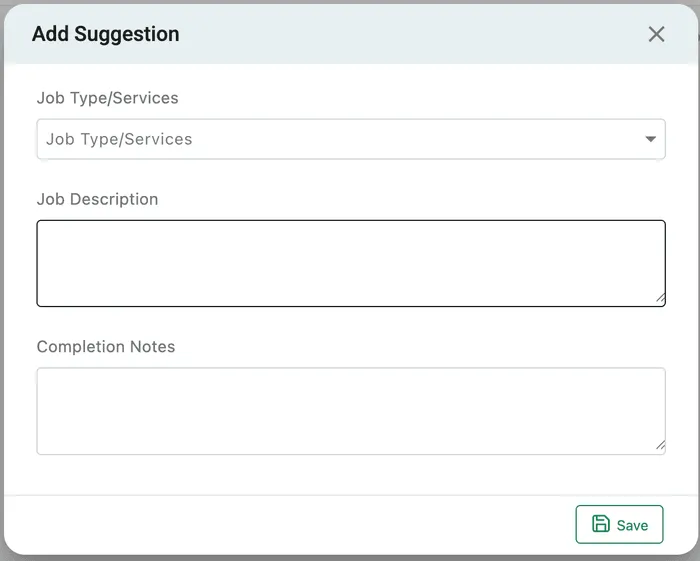
Settings → Modules → Work → Job Suggestion → Add Suggestion
| Field | What it is |
|---|---|
| Job Type/Services | Which service this wording belongs to. Leave it as All to offer the same text on every job. |
| Job Description | What the work involves, offered when the job is written. |
| Completion Notes | What was done, offered when the job is finished off. |
Save adds it.
Both boxes take several lines, and the shipped examples are written as numbered steps — 1. Install CCTV camera units at designated locations 2. Mount… — which is the shape that works best. A description that reads as a checklist is one an engineer can work through; a paragraph is one they skim.
Which suggestion appears
Section titled “Which suggestion appears”The Job Type/Services column is the match. Pick Camera Installation on a job and the suggestion filed under that service is offered; a suggestion filed under All is offered on anything.
Suggestions are offered, not imposed. Whoever is filling the form in can take the wording, change it, or ignore it.
Why it is worth doing
Section titled “Why it is worth doing”Two of the things a service business is judged on come out of these boxes. The description is what the engineer reads before they arrive, so a vague one produces a wasted visit. The completion note is what the customer reads on the job card afterwards, and it is often the only written account they get of what they paid for.
Standardising both means the answer does not depend on who happened to type it.