Client Receivable Report
Client Receivable Report is the money you are owed, listed by who owes it and how long they have owed it.
The Invoice Report tells you what a period billed and what came back against it. This one starts from the other end: forget the period, show me what is still outstanding and how old it is.
Open it from Add Report — see generating a report.
What it asks for
Section titled “What it asks for”
Reports → Client Receivable Report
There are two ways to narrow it, and the OR between them is literal — you use one or the other, not both:
- Date Range picks the outstanding amounts that fell due inside a window of dates.
- By Due Date works in ages instead: 31 Days to 60 Days and the other bands, counted from when the money was due.
By Due Date is the one to reach for. Collections is not really a calendar question — nobody chases “the invoices due in the first week of June”. It is an age question: what has been outstanding a month, what for two, what has drifted past ninety days and needs a different conversation.
Neither is required, and Show Column decides which of the columns come through.
What comes back
Section titled “What comes back”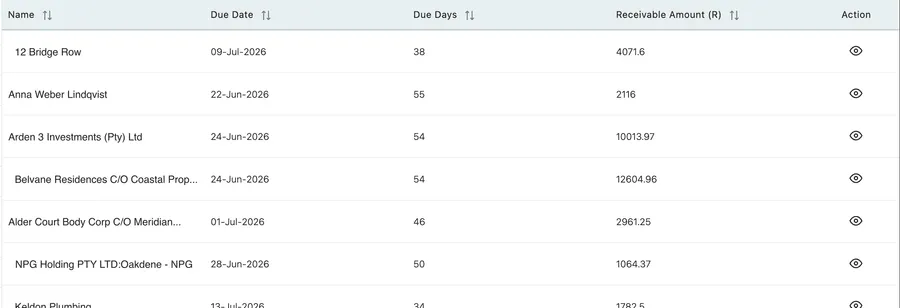
Reports → Client Receivable Report
| Column | What it tells you |
|---|---|
| Name | The client the money is owed by. |
| Due Date | When it fell due. |
| Due Days | How many days ago that was. This is the age of the debt. |
| Receivable Amount | How much is still outstanding. |
| Action | The eye opens what sits behind the figure. |
Working the list
Section titled “Working the list”The report arrives sorted by name, which is the one order that is no use for collecting. Sort it before you start.
By Receivable Amount puts the money first. Chasing is finite work, and one client owing twelve thousand is worth more of it than eleven owing a few hundred each.
By Due Days puts the oldest first, which is the other true reading — debt does not improve with age, and the invoice nobody has mentioned for two months is the one most likely to be disputed, forgotten, or written off.
Most collection runs use both: work the top of the amount list, then the top of the age list, and leave the middle for the automated reminder.
Saving it
Section titled “Saving it”This is a report worth having on a schedule rather than remembering to run.
Save it with By Due Date set to the band you actually act on, then have it emailed to whoever chases payment — see saved reports and auto email. A weekly list of what has crossed thirty days, landing in the right inbox on Monday morning, is the difference between collections being a job someone does and a job someone means to do.
Related
Section titled “Related”- Invoice Report — what was billed over a period, with Due Amount as the total still owed.
- Invoice payments — recording money against an invoice once it arrives.
- How invoices work — the invoice itself, and its statuses.