The travel reports
Travel is real time and real money that sits on no job. Two reports in the fieldworker section of the catalogue measure it, and they measure it differently:
- User(s) Travel Report On Job(s) works from the addresses of the jobs somebody attended.
- User(s) travel report based on GPS works from the location trail their phone recorded.
They will not agree, and knowing why is most of what you need from this page.
Open either from Add Report — see generating a report.
User(s) Travel Report On Job(s)
Section titled “User(s) Travel Report On Job(s)”Date Range is required. User(s) narrows to one person or several, and Select Unit chooses kilometres or miles.

Reports → User(s) Travel Report On Job(s)
The result comes in two parts, and the second is the useful one.
The first is Total Distance Covered with a row per job — this is recorded travel, the distance someone entered against the job. Where nobody entered anything it reads 0.00, and since most travel is never keyed in by hand, that is what it usually reads.

Reports → User(s) Travel Report On Job(s)
The second part is the one to read. Each row is a leg — from one job’s address to the next job’s address — with the Approximate Distance between them, and Total Approximate Distance underneath. That figure is calculated from the addresses themselves, so it is there whether or not anyone recorded anything.
It counts the journeys between jobs, and only those. Getting from home or the depot to the first job of the day, and back from the last one, is not in it. For most days that is two of the longest legs missing, so treat the total as travel between work rather than a full day’s driving.
User(s) travel report based on GPS
Section titled “User(s) travel report based on GPS”Date Range and User(s) are both required here. Select Unit and Show Column work as they do elsewhere.
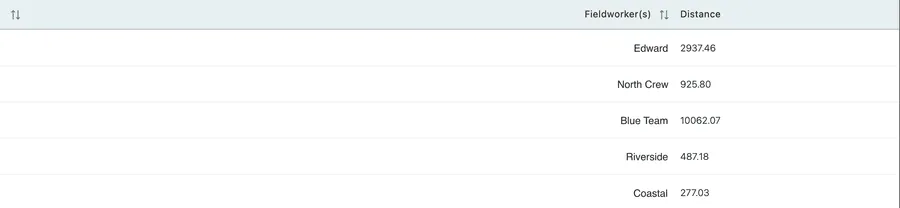
Reports → User(s) travel report based on GPS
The result is one line per fieldworker with a single Distance for the whole period, taken from the location trail their phone sent while they were checked in — see the fieldworker app.
Because it follows the phone rather than the job list, it counts everything: the depot run, the detour to a merchant, the drive home. It also counts anything the phone got wrong, and a device reporting poor positions can add distance that was never driven.
Which figure to use
Section titled “Which figure to use”For anything anyone will be paid or billed on, use the job-address figure. It is derived from data that is always there, it comes out the same every time it is run, and it can be explained to whoever queries it — this leg, between these two addresses.
Use the GPS figure to ask questions, not to settle them. It is the only one of the two that sees travel outside the job list, so it is useful for spotting a week that looks nothing like the work that was done.
When the two disagree by a wide margin, that gap is the finding. A GPS figure far above the route figure is either genuine travel that never touched a job — which is worth understanding — or a device reporting badly, which is worth fixing before anybody reads another number from it.
Related
Section titled “Related”- Job Report — the jobs behind the legs, and how they were scheduled.
- Worklog and timesheets — travel time, which is a different figure from travel distance and is the one that turns into pay.
- Viewing fieldworkers on the map — where people actually are.