Approving and paying an expense
A claim is submitted, looked at, and settled. The status on the expense is where it has got to in that.
The statuses
Section titled “The statuses”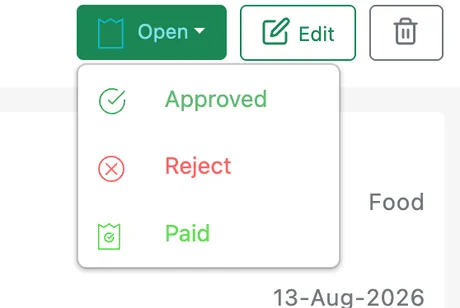
Expenses → a claim → the status dropdown
| Status | What it means |
|---|---|
| Open | Submitted and waiting on a decision. Every new claim starts here |
| Approved | Accepted. The spend is agreed and the company owes the person who paid |
| Reject | Turned down. The claim stays on the record with the reason it went no further |
| Paid | The money has gone back to whoever spent it |
Approved and Paid are two separate moments — agreeing to a claim, and reimbursing it. Leaving approved claims sitting on Approved until the money actually goes out is what tells you at a glance what you still owe your people.
The dropdown at the top right of the claim is labelled with the status it is on now; picking a new one moves it.
Status history
Section titled “Status history”
Expenses → a claim → Status History
Status History on the expense keeps every step the claim has been through:
- Changed By — who made the change.
- Date — when.
- Comment — any note left with it.
- Status — what it moved to.
The first row is the claim being submitted, so a claim that has been approved and paid reads as three lines from the person who spent the money to the person who paid them back.