Contract settings
Settings → Modules → Contract holds two screens.
Default settings
Section titled “Default settings”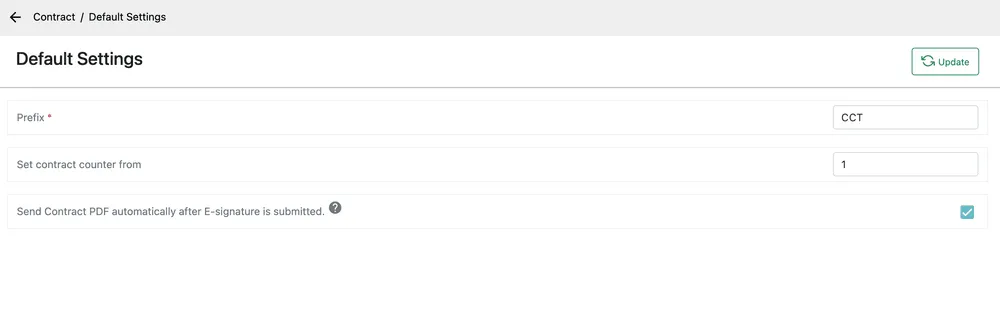
Settings → Modules → Contract → Default Settings
| Setting | What it does |
|---|---|
| Prefix | The letters in front of every contract number. Required. |
| Set contract counter from | The number the next contract takes. |
| Send Contract PDF automatically after E-signature is submitted | Emails the signed contract to the client the moment they sign it, without anyone pressing send. |
Update saves.
Contract category
Section titled “Contract category”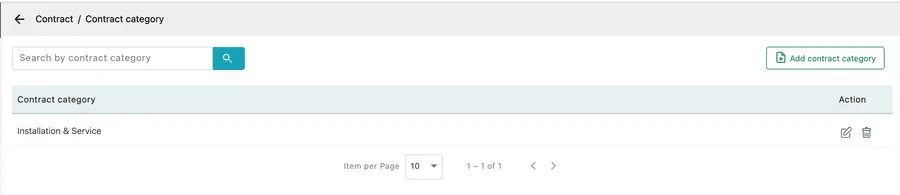
Settings → Modules → Contract → Contract category
Categories group agreements by the kind of arrangement they are — Installation & Service, Annual Maintenance, Monitoring, Leasing. They are what you filter and report on when you want to know how much of your recurring revenue comes from which kind of contract.
Add contract category, type the name, Save. The pencil edits a row and the bin deletes it.
A category is a label, not a behaviour. What a contract actually does — how it bills, when it generates work — comes from the contract type and its work pattern, not from the category it sits in.