Labour billing rates
A labour billing rate is an hourly rate you charge for people’s time — a standard rate, an out-of-hours rate, an emergency call-out rate. Saving them here means picking one on a job instead of typing a number every time.
Settings → Modules → Work → Labour billing rates.
Adding a rate
Section titled “Adding a rate”Add labour billing rates opens the dialog.
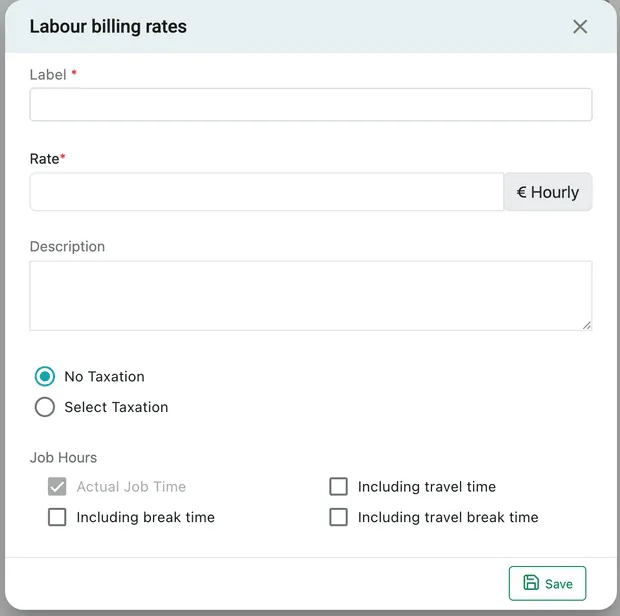
Settings → Modules → Work → Labour billing rates → Add labour billing rates
| Field | What it is |
|---|---|
| Label | What the rate is called — Standard, Out of hours, Weekend. Required. |
| Rate | The amount per hour, in your company currency. Required. |
| Description | What it covers, and the text that goes onto the invoice line. |
| No Taxation / Select Taxation | Whether tax is added to labour charged at this rate. |
| Job Hours | Which hours this rate bills for — see below. |
Save adds it to the list, where the columns show the label, description, rate and tax detail.
Job Hours: what counts as billable
Section titled “Job Hours: what counts as billable”Four tick boxes decide which of the engineer’s recorded hours this rate charges for:
| Option | Charges for |
|---|---|
| Actual Job Time | Time on the job itself. Always on — it is the thing you are billing. |
| Including travel time | Getting to site as well. |
| Including break time | Breaks taken during the job. |
| Including travel break time | Breaks taken while travelling. |
Actual Job Time is ticked and cannot be cleared. The other three are yours, and they are usually a term of the agreement rather than a preference — a client on a fixed call-out fee expects to pay for travel; a client on a maintenance contract usually does not.
Building the answer into the rate rather than deciding it job by job means the person invoicing does not have to remember which client is which.
Where the rate gets used
Section titled “Where the rate gets used”Rates saved here appear as Predefined Rate in the Labour window on a job — Job → Item / Invoice → Item(s) → Calculate → Internal Labour. The alternative, Custom Rate, is a number typed for that job alone.
The same window carries Billing Based On, which is the Job Hours choice again at the point of billing, so a one-off exception can still be made without changing the saved rate.
Labour is calculated on the job and reaches the invoice from there — the reasoning is in invoice line items.
Not the same as a service rate
Section titled “Not the same as a service rate”A job type/service has a Rate too, and the two are for different jobs of work:
- A service rate prices a piece of work — CCTV Installation, 90 a unit. It does not care how long it took.
- A labour billing rate prices time — the hours your team actually recorded.
Businesses that quote fixed prices live on service rates. Businesses that bill for attendance live on labour rates. Plenty do both.