Purchase Order Report
Purchase Order Report is every order you have raised on a supplier over a period: what it was worth, what state it is in, and when it was supposed to arrive.
Open it from Add Report — see generating a report.
What it asks for
Section titled “What it asks for”
Reports → Purchase Order Report
There are two date filters, and the difference between them is the whole point:
- Order Date — required. When the order was raised.
- Delivery Date — when it was due to arrive.
Filtering on Delivery Date with a range that has already passed, and reading the PO Status column, is how you find orders that should have landed and have not. That is the single most useful thing this report does.
What comes back
Section titled “What comes back”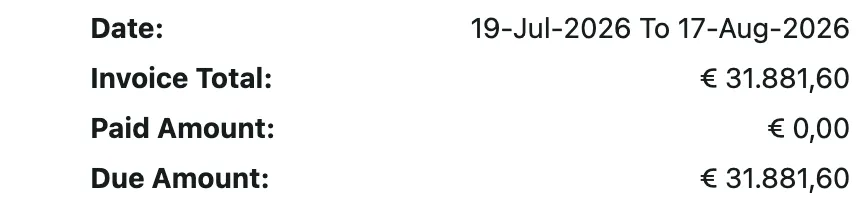
Reports → Purchase Order Report
Three figures head the report: what was ordered in the period, what has been paid against it, and what is still due.

Reports → Purchase Order Report
| Column | What it holds |
|---|---|
| Order Reference | The order’s own number. |
| Supplier Name | Who it was raised on. |
| PO Status | New, and the rest of the states an order moves through — see purchase orders. |
| Total Amount | What the order came to. |
| Total Paid and Due Amount | What has gone out against it, and what has not. |
| Order Date and Delivery Date | When it was raised, and when it was due. |
Reading it
Section titled “Reading it”Status against delivery date is the pairing to read. An order still sitting at New with a delivery date in the past is the one to chase — either the goods never came, or they came and nobody recorded receiving them, and those are different problems. Receiving is what turns an order into stock; see receiving a purchase order.
Due Amount aggregated by supplier is the same figure the Supplier Report shows as one balance. Come here when you need to know which orders make it up.
Related
Section titled “Related”- Purchase orders — the order page, its statuses and payments.
- Creating a purchase order — the order form.
- Receiving a purchase order — marking goods received, into stock or onto the job.
- Purchase Order Item Report — the same orders broken down to their lines.