Invoicing a contract
A contract can raise its own invoices, or leave it to you. Either way the contract knows what belongs on the bill — the recurring fee, and the jobs done in that period.
Automatic or manual invoicing
Section titled “Automatic or manual invoicing”- Automatic — the system raises each period’s invoice on the frequency you set, and can email it to the client with the job sheet attached. Any deposit goes onto the first of them; remove it there and it reappears on the next invoice, because a deposit stays outstanding until it is actually charged.
- Manual — you raise the invoice when you are ready. The jobs performed in that month (or quarter) are gathered onto it for you to check before sending.
When you raise one by hand, the contract does the gathering for you. Fetch & Link opens by itself and offers everything that belongs on that period’s bill:
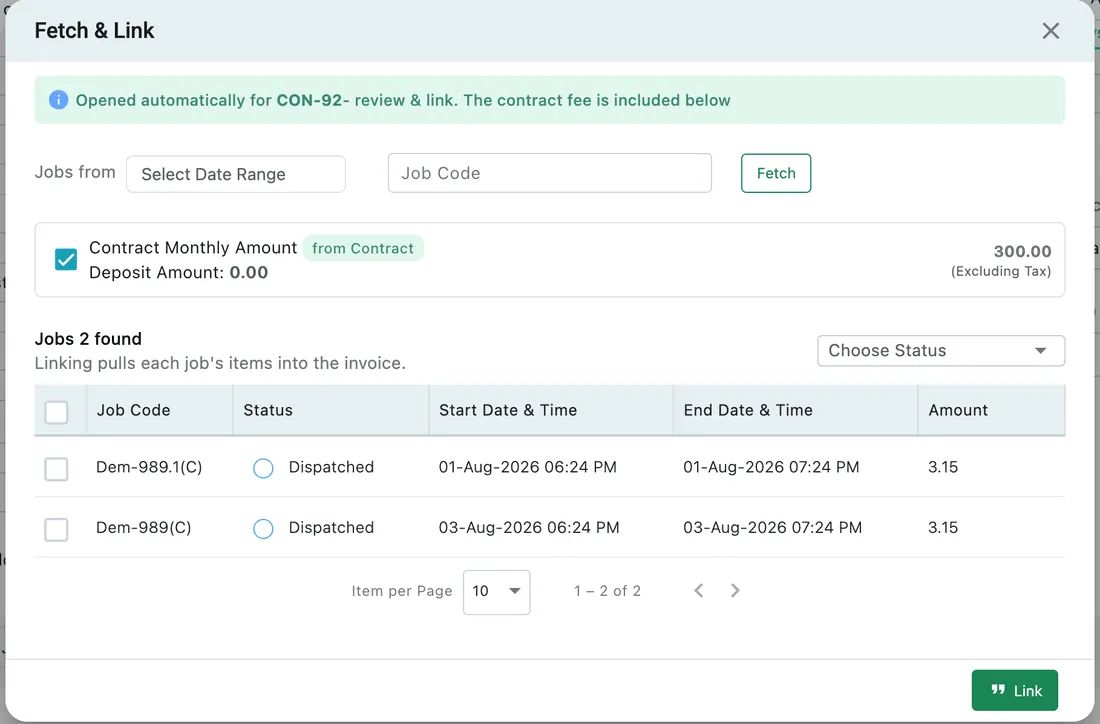
Add Invoice → Fetch & Link
There are two things on offer:
- The contract fee — the recurring amount, already ticked and labelled from Contract, together with any deposit that has not been charged yet. This is what the client owes regardless of what happened during the period. The deposit goes on whichever invoice you tick it on, and once used it stops being offered.
- The jobs done in the period — each with its status, dates and amount. Ticking one pulls that job’s items into the invoice.
The period comes filled in. Fetch & Link opens with a date range already selected — the contract’s first billing period on the first invoice, and the period after it each time you raise another, so a monthly contract starting on 1 January offers 1–31 January, then 1–28 February, and so on down the term. The range is yours to change, and the jobs listed are whatever falls inside the range you settle on. Ticking a job brings its items onto the invoice.
That second part is the rate card rule again: a job whose services sat inside the free quota brings nothing to charge, while a job carrying priced items adds them to the bill. A job that brings nothing has an empty cart, and the reason is always one of three — the service is not on the rate card, it was never picked on the job, or the rate card changed after the job was created. See it takes both. Narrow the list by date range, job code or status if you need to; anything you leave unticked simply stays off this invoice.
You can switch a running contract between automatic and manual from the billing panel.
Stopping the billing part-way through
Section titled “Stopping the billing part-way through”There is no pause for automatic invoicing. Automatic means the recurrence is on, and it stays on until the contract expires — you cannot hold it for a month and resume it.
To stop it, switch the contract from Automatic to Manual on the billing panel. The invoices then only appear when you raise them, which is what you want while an agreement is on hold, in dispute, or waiting on a decision. Switch it back to automatic when the arrangement resumes.
This is separate from pausing a work pattern, which stops the work being raised. Pausing the pattern does not stop the recurring fee — that is billing, and it goes on until you switch to manual or the term ends.
Invoicing after the term has ended
Section titled “Invoicing after the term has ended”Automatic invoicing stops with the term. Once a contract is Expired it raises nothing further on its own, so no bill appears for a period the agreement no longer covers.
Raising one by hand is not blocked. Open the expired contract and Add Under This Contract → Add Invoice behaves as it did while the contract was running: the same Fetch & Link, the same date range rolling on to the next period, the same jobs gathered from whatever range you choose. Billing past the end date only produces a warning — you are told the period falls outside the term, and you can carry on.
That is deliberate, because the last invoice of a contract is usually raised after it has expired, and work is often billed later than it was done.