Adding items in the app
Half of what a job ends up being charged for is decided on site, not in the office. The camera the van did not have, the extra hour, the cable that turned out to be perished — Add on the job’s Item panel is where the person who fitted it puts it on the job.
Whatever they add lands on the job’s Item / Invoice tab in the office and carries through to the invoice, exactly as if you had typed it in yourself. See items and services on a job.
The Add Item screen
Section titled “The Add Item screen”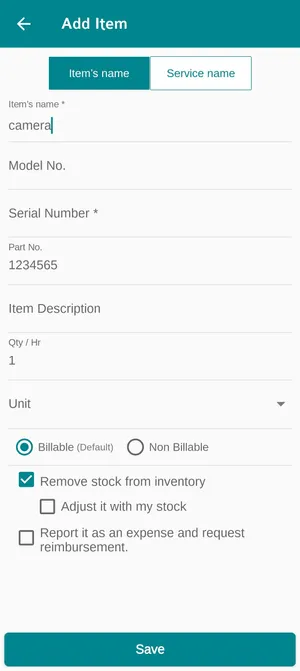
The app → a job → Item → Add
The two tabs at the top decide what is being added. Item’s name is a thing — a part, a unit, a length of cable. Service name is work — labour, a call-out charge, a service performed.
The fields underneath identify it: Model No., Serial Number and Part No. for an individual unit, a description, then Qty / Hr and a Unit. The serial number is worth filling in properly, because it is what lets that unit be found again later — and what makes it possible to turn the line into a tracked piece of equipment.
Billable or Non Billable decides whether the client is charged for the line at all. Billable is the default; a part fitted free under goodwill or warranty is the case for the other one.
The three tick boxes
Section titled “The three tick boxes”The boxes above Save are small and they do a lot. They are the difference between an accurate stock figure and a fictional one.
The app → a job → Add Item
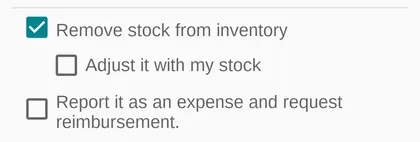
Remove stock from inventory takes the part off your stock, because it has just been fitted at a client’s site. It arrives ticked on anything picked out of the inventory — the honest default, since a part that went into a machine is no longer on a shelf. Untick it only when the part genuinely did not come from your stock.
Adjust it with my stock sits underneath it, and says the part came out of this fieldworker’s own van rather than the warehouse. Stock loaded into a van is already off your Stock on Hand — it was taken off when it was assigned — so this is what keeps that person’s own holding correct. See assigning stock to fieldworkers.
Report it as an expense and request reimbursement is for the part they paid for themselves, on the way, because nobody had one. Ticking it raises an expense claim in their name, which goes through approval and payment like any other claim.
The last two are worth understanding together, because they answer different questions. Where did the part come from? and who is out of pocket? A camera bought at a merchant on the way to site is not your stock and is the fieldworker’s money — so it is not a stock deduction, and it is a claim. A camera out of the van is your stock and nobody’s money.
Save puts the line on the job.