Finding and managing users
The user list down the left of the Users screen is fine for a handful of people. Table View is what you want when there are more.
Table View
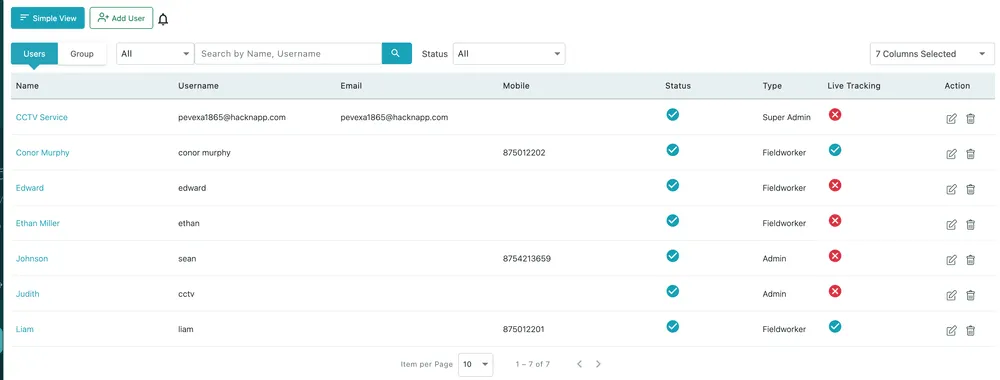
Section titled “Table View”Table View, above the list, redraws everyone as a table with a column per field.
Users → Table View
The button is labelled with the view you are going to, so Simple View brings you back to the list.

Users → Table View
- Search by Name, Username finds a person by either. It is the fastest way in when you know who you are looking for.
- Status narrows the table to Active or Inactive people. On All everyone is listed, whatever their status — which is the difference between this and the Show Inactive Users tick box in Simple View.
- Columns Selected chooses which columns the table carries. Turn off what you never read and the table gets narrower.
- Users and Group switch between the individual people and the groups.
The columns tell you at a glance what each person is: their Type, whether their status is a tick or a cross, and whether Live Tracking is on for them. The pencil on the row opens them for editing and the bin deletes them.
Editing someone
Section titled “Editing someone”Edit User, in the corner of a person’s record, opens everything on it — their details, their shift, their wage, their permissions. Update saves the changes.
A username can be changed like anything else, but tell the person before you do it. They will be signing in with it.
Making someone inactive
Section titled “Making someone inactive”Set a person’s Status to Inactive and they can no longer sign in. Their work, their attendance and their payment history all stay exactly where they are.
No sign-in means nothing new from them. An inactive fieldworker cannot open the app, so they cannot check in, work a job, or submit an expense claim — everything a fieldworker does is done there. What they filed while they were active is untouched and still theirs: claims already submitted carry on through approval and payment as normal. Inactive stops the person acting, not the record of what they did.
Inactive people drop out of the user list until Show Inactive Users is ticked, which keeps the list to the people working today without losing anybody’s record.
Work they had not finished stays in the system as unassigned. Nothing is cancelled and nothing disappears: the jobs that were on them simply have nobody on them any more, and they turn up in the unassigned list on the scheduler like any other work waiting for a name. From there you either give each one to somebody else, or close it off — complete, cancel or closed — if it is not going to happen.
Doing that sweep is the other half of making somebody inactive. The record is safe either way, but until the jobs are picked up they are sitting on a list rather than in somebody’s day.
This is what to do when somebody leaves. Deleting them is not.
Deleting someone
Section titled “Deleting someone”The bin in the corner of a person’s record removes them from the account.
Anybody who has jobs created against them cannot be deleted at all. The app refuses it, and Inactive is the only route for that person — which covers almost everybody who has actually worked.
Where a delete does go through, it does not sweep the record clean behind it. Historical records stay in the system for reporting: their expenses are still in the expense reports, and the figures they contributed to are still whatever they were. Deleting removes the person from the account, not the account’s history of them.
Make people inactive rather than deleting them. An inactive user keeps their history — the jobs they did, the hours they logged, the months they were paid for — and that history is what you will want the next time a job they worked on comes back. Delete only the account that should never have existed: the duplicate, the test user, the person who was set up and never started.