Work patterns — the schedule that creates jobs
A work pattern is the engine that turns a contract into actual visits. You describe the routine once, and the system creates the jobs on the dates they fall due for the life of the contract.
The useful way to think about it: a pattern is a job template plus a schedule. Everything you set on it — the services, the equipment, the tools, who does it — is stamped onto every job it creates, so those jobs arrive ready to work rather than as empty placeholders.
Add one from the Work Patterns / Jobs step of the contract, with + Add Work Pattern.
The schedule
Section titled “The schedule”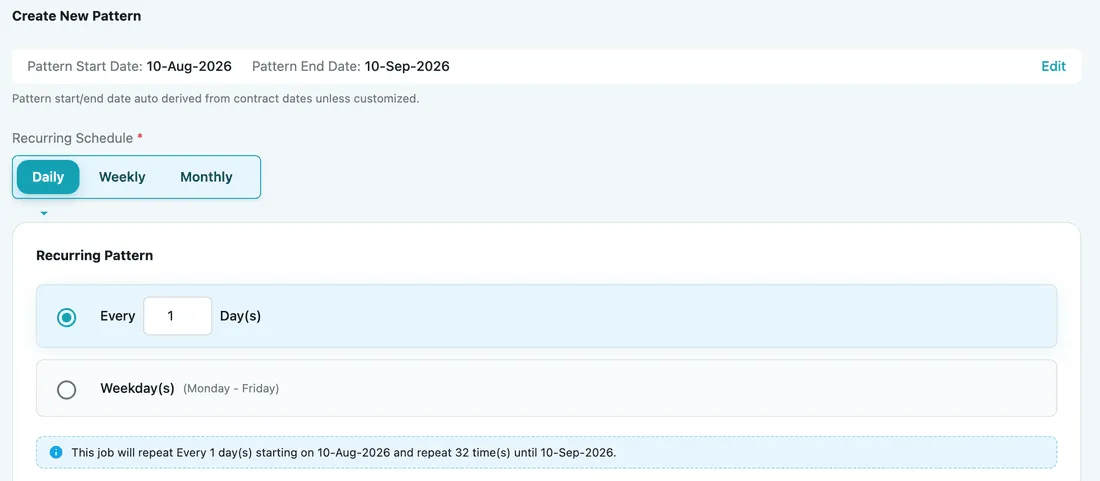
Add Contract → Work Patterns / Jobs → Create New Pattern
Pattern dates default to the contract’s own dates, so a pattern normally runs for exactly as long as the agreement does. Edit lets you narrow that — useful when a routine only applies to part of the term.
A pattern assigns its jobs without checking whether that person is already booked. The warning you get when adding work by hand does not apply here, so two contracts can put the same fieldworker on the same hour — worth a look at the board when a client has several agreements running.
Recurring Schedule is the cadence: Daily, Weekly or Monthly. Each opens its own options — a daily pattern, for example, can run every N days, or only on weekdays (Monday–Friday).
Schedule Start Time and Schedule End Time set the time window each generated job carries.

Create New Pattern → schedule times
What each job will carry
Section titled “What each job will carry”Everything below is copied onto every job the pattern produces.
The services
Section titled “The services”
Create New Pattern → Job Type/Services
This is the work to be performed — and the note under it restates the most important rule on any contract:
Only services defined in Service Rate Configuration are treated as invoice items. Services selected here but not configured there remain to-do job services and are not billed as invoice items.
In other words, putting a service on a pattern schedules the work; putting it on the rate card is what makes it billable. It takes both — a service on the rate card that this pattern never asks for is not charged, because the work was never done.
Set the rate card up before the pattern starts producing jobs. A rate card change reaches only the jobs raised after it; the ones the pattern has already generated keep the carts they were created with. See changing the rate card after a job exists.
Items, equipment, location and tools
Section titled “Items, equipment, location and tools”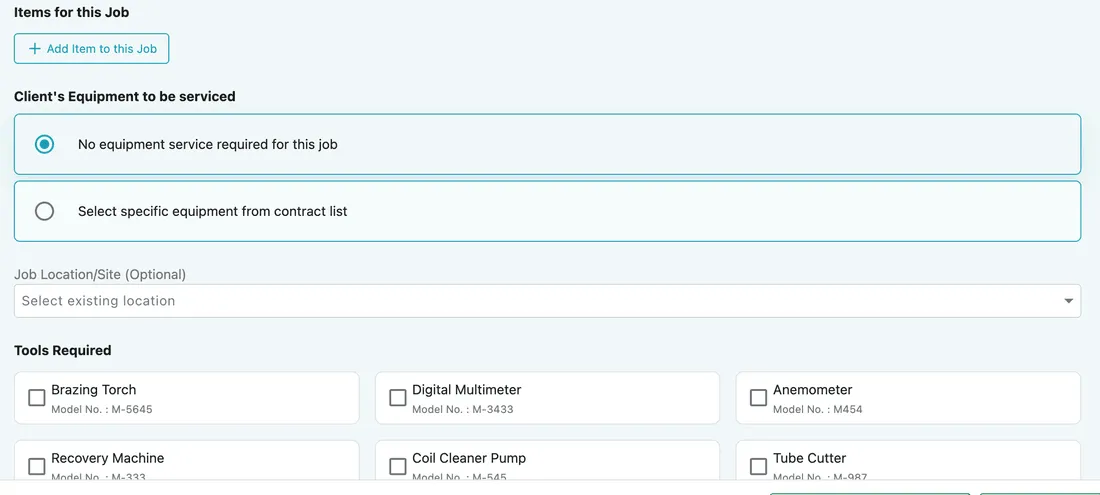
Create New Pattern → job contents
- Items for this Job — materials the visit normally consumes, attached up front so nobody has to remember them.
- Client’s Equipment to be serviced — either no equipment service required, or specific equipment picked from the contract’s list. That second option is what lets one contract cover a large estate: each pattern targets its own subset of units.
- Job Location/Site — optional, for when the work happens somewhere other than the client’s default site.
- Tools Required — a checklist of tools, each with its model number, so the technician turns up equipped instead of driving back for a multimeter.
Crew and instructions
Section titled “Crew and instructions”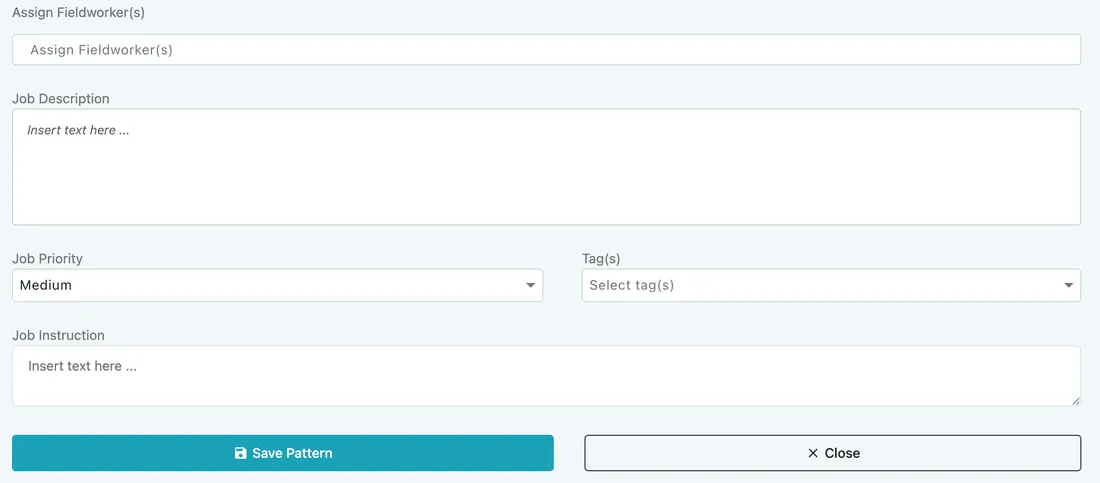
Create New Pattern → assignment and instructions
- Assign Fieldworker(s) — the generated jobs come pre-assigned rather than landing unassigned in the scheduler.
- Job Description and Job Instruction — what the visit is, and how to carry it out.
- Job Priority and Tag(s) — so recurring work sorts and filters alongside everything else.
Save Pattern adds it to the contract, and the jobs then appear on their scheduled dates on their own.
Several patterns on one contract
Section titled “Several patterns on one contract”A single contract can hold several patterns, each on its own cadence — which is what lets one agreement cover quite different routines.

Contract page → Work Terms / Pattern
Office cleaning. Daily dusting and a weekly window clean become two patterns on one contract, each with its own services.
A shopping mall with 100+ cameras. Instead of one impossible visit, set up four weekly patterns, each pointing at a different 25 cameras through Select specific equipment from contract list. The whole estate gets serviced every month under a single contract, and each visit tells the technician exactly which units to check.
Changing, pausing or ending a pattern
Section titled “Changing, pausing or ending a pattern”A pattern is not fixed once the contract is running. All of it happens in the same place: open the contract, press Edit Contract, and go to the Work Patterns / Jobs step. The wizard reopens with everything already filled in, and Add Work Pattern at the foot of that step adds another one. See the contract lifecycle.
Open the pattern you want and four buttons sit under it:

Edit Contract → Work Patterns / Jobs → an open pattern
| Button | What it does |
|---|---|
| Update Pattern | Saves the changes you have made to it. |
| Pause | Stops it raising new jobs, keeping the pattern and everything it has already produced. Switch it back when the routine resumes. |
| Terminate | Ends the pattern for good — this is how a work pattern is removed from a contract. |
| Close | Leaves it as it was. |
Pause is the one to reach for more often than people expect: a site shut for refurbishment, a client on hold over a dispute, a service that stops over winter. Nothing is lost, and nothing has to be rebuilt when it starts again.
What you can change before pressing Update Pattern:
- The cadence — daily, weekly or monthly, and the options underneath. Read the summary line again before saving; it tells you how many jobs the new cadence will produce.
- The dates the pattern runs between, with Edit beside the pattern dates. Narrowing these winds the routine down on a date instead of ending it outright.
- What each job carries — the services, items, equipment, tools, crew and instructions.
What happens to the jobs it already made
Section titled “What happens to the jobs it already made”A pattern raises its jobs ahead of time — Advance day for recur pattern in work settings decides how far ahead — so by the time you come back to it, jobs dated next week or next month usually exist already.
Editing a pattern leaves them alone. They keep the details and the prices they were created with, and only the jobs raised afterwards follow the new version. See changing the rate card after a job exists.
Ending a pattern sorts them into two piles:
- A job nobody has acted on goes with the pattern. Setting a pattern up creates its jobs immediately, so a pattern you got wrong — or want to rebuild on different terms — leaves a run of jobs you never wanted. Ending it clears them rather than leaving you to delete each one.
- A job that has been acted on stays. Once its status has moved, or work has been recorded against it, that job is the record of something that happened and it keeps its history.
That is what makes ending a pattern safe to do early and non-destructive to do late.
One more thing to watch: changing the services changes what bills. A service you add to a pattern still has to be on the rate card before it charges anything — see work patterns follow the same rule.
Related
Section titled “Related”- Fixed price and service based contracts — whether a pattern’s services are free, quota-limited or charged
- Jobs under a contract — how the generated jobs behave once they exist
- Equipment on a contract — linking the equipment a pattern can target